
6 Best Open Source Subscription Trackers (Self-Hosted Options)
6 open source subscription trackers you can self-host. Compare Wallos, SubTrackr, Subs, and more - plus when a hosted option makes more sense.
Looking for an open source subscription tracker you can self-host? Whether you prioritize data privacy, want full control over your infrastructure, or simply prefer avoiding recurring SaaS fees, self-hosting puts you in the driver's seat.
This guide covers six open source subscription management tools you can deploy on your own server. We'll also be honest about the trade-offs - self-hosting requires technical knowledge, time investment, and ongoing maintenance.
New to tracking subscriptions? Start with our subscription audit guide to discover what subscriptions you're actually paying for before setting up tracking.
Why Choose Open Source & Self-Hosted?
Self-hosting subscription tracking software offers compelling benefits for the right person:
Benefits
- Complete data privacy - Your subscription data stays on your server, not a third-party cloud
- No recurring SaaS fees - Pay only for hosting infrastructure ($5-10/month)
- Full customization - Modify the code to add features or change behavior
- No vendor lock-in - Export your data anytime, switch solutions freely
- Learning opportunity - Great project for practicing DevOps skills
The Trade-Offs
Be realistic about what self-hosting requires:
- Technical knowledge needed - Docker, Linux basics, web server configuration
- Server costs - VPS hosting runs $5-10/month (more than "free")
- Time investment - 1-3 hours initial setup, ongoing maintenance for updates
- You're the sysadmin - Responsible for uptime, security patches, backups, troubleshooting
- No support team - Community forums help, but you're largely on your own
If these trade-offs are worth it for data control and customization, here are your best options.
Quick Comparison
| Tool | Tech Stack | GitHub Stars | Key Feature | Best For |
|---|---|---|---|---|
| Wallos | PHP/Docker | 5.6k+ ⭐ | Most complete | Most users |
| SubTrackr | Go/HTMX | Active | Analytics dashboard | Developers |
| Subs | Client-side | Active | Simplest setup | Privacy purists |
| Subscription Manager | Docker Compose | v2.0.0 | Calendar view | Visual planners |
| SubTracker Mobile | React Native/Expo | Active | Native mobile app | Mobile-first users |
| Subscriptions | Ruby on Rails | Active | Price history tracking | Cost watchers |
1. Wallos - The Most Complete Option
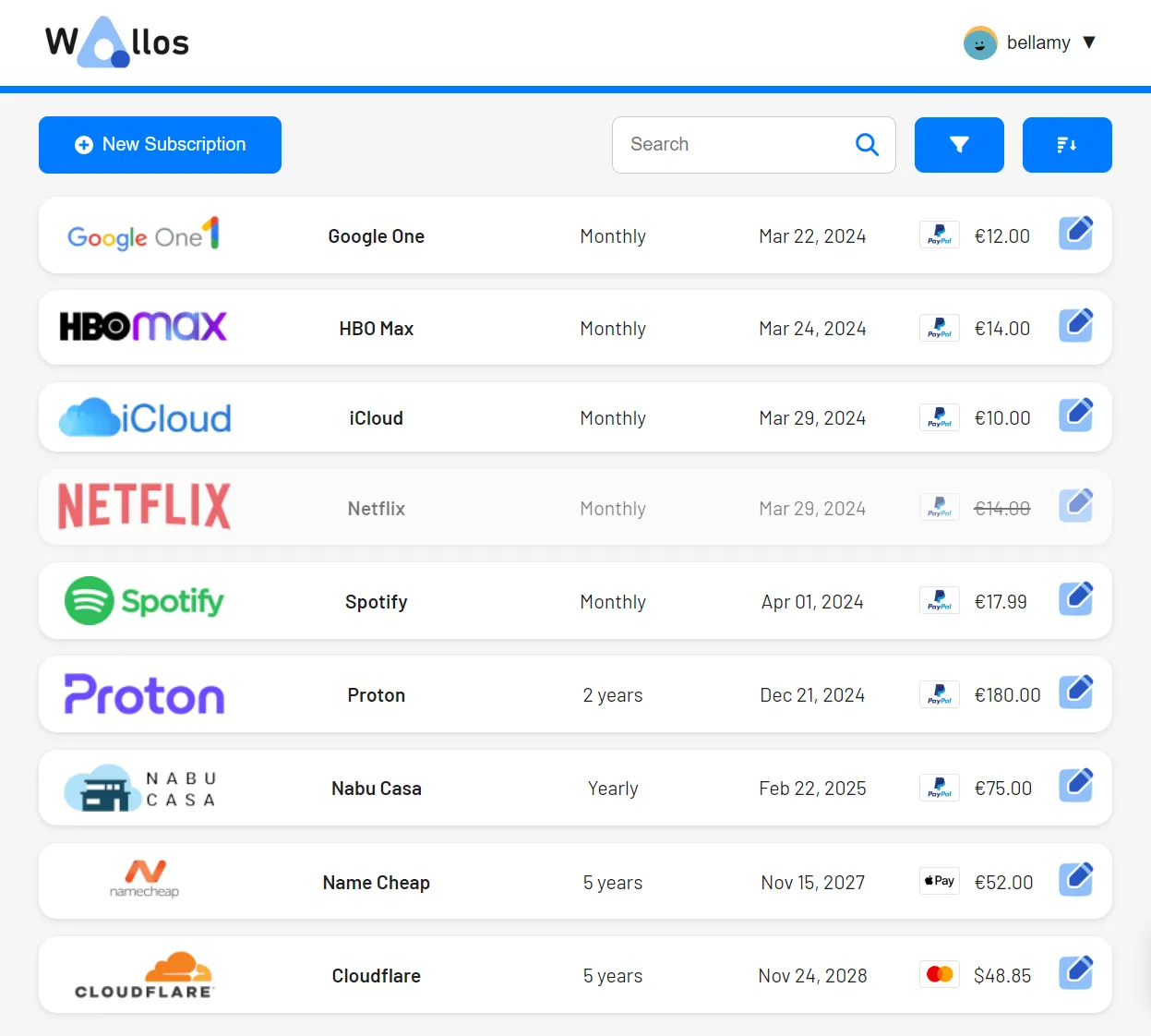
What it does: The most popular and feature-rich open source subscription tracker. Wallos offers extensive functionality including multi-currency support, multiple notification methods, and household sharing.
Key Features
- ✅ Multi-currency support with automatic conversion rates
- ✅ Multiple notification methods - Email, Discord, Telegram, Pushover, webhooks
- ✅ Comprehensive statistics - Spending analytics and visualizations
- ✅ Household groups - Share subscription tracking with family
- ✅ Logo search - Automatically fetch service logos for visual identification
- ✅ 21+ languages - Extensive localization support
- ✅ Mobile responsive - Works well on phones and tablets
- ✅ Optional AI recommendations - Get suggestions for cost savings
Tech Stack & Deployment
- Stack: PHP 8.2+, SQLite database
- Deployment: Docker (recommended) or bare metal with web server
- Requirements: Docker & Docker Compose OR PHP 8.2+, Nginx/Apache
Best For
Most users. Wallos is the most complete solution with the largest community, best documentation, and most active development.
→ View Wallos on GitHub2. SubTrackr - For Analytics Lovers
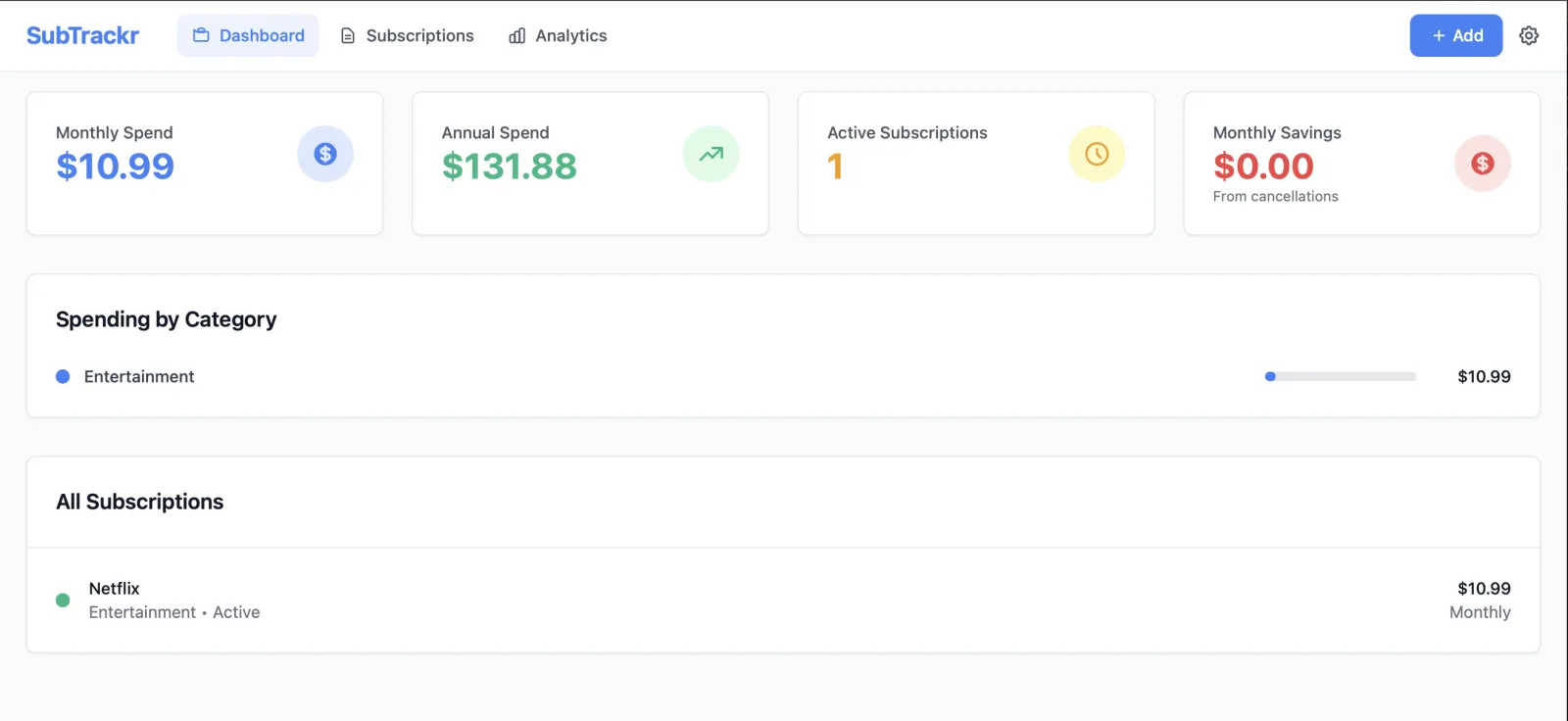
What it does: Modern subscription management built with Go and HTMX, featuring real-time analytics dashboard and comprehensive spending insights.
Key Features
- ✅ Real-time dashboard - Live monthly/annual overview updates
- ✅ Analytics by category - Visualize spending patterns per category
- ✅ Email renewal notifications - Get reminded before charges
- ✅ Data export - CSV and JSON export for backups
- ✅ Multi-currency support - Track subscriptions in different currencies
- ✅ RESTful API - Integrate with other tools and automation
- ✅ Mobile responsive - Clean interface on all devices
Tech Stack & Deployment
- Stack: Go backend, HTMX frontend, SQLite database
- Deployment: Docker with support for AMD64, ARM64, Apple Silicon
- Requirements: Docker
Best For
Developers who appreciate modern tech stacks and want detailed analytics with API access.
→ View SubTrackr on GitHub3. Subs - Simplest Setup
What it does: Modern, lightweight subscription tracker built with Remix and React. Offers flexible storage options - use browser storage for maximum privacy or SQLite for persistent data across devices.
Key Features
- ✅ Flexible storage - Browser storage (client-side) OR SQLite (persistent)
- ✅ Automatic favicon fetching - Visual identification with service logos
- ✅ Multi-currency support - Track subscriptions in different currencies with automatic conversion
- ✅ Total cost calculation - Instant monthly and yearly expense overview
- ✅ Import/export - Easy data backup and migration between devices
- ✅ Clean interface - Modern design with Shadcn UI components
- ✅ Responsive - Seamlessly works on desktop and mobile
Try the demo: subs.ajnart.fr →
Tech Stack & Deployment
- Stack: Remix (React framework), Tailwind CSS, Shadcn UI, Zustand (state management), Bun
- Deployment: Docker (recommended) OR use the online version at subs.ajnart.fr
- Storage: SQLite database OR browser local storage (configurable)
- Requirements: Docker for self-hosted, or just use the online version
Best For
Privacy purists who want the simplest possible setup, or those who prefer client-side-only solutions.
→ View Subs on GitHub4. Subscription Manager - Calendar View
What it does: Single-page React application for managing subscriptions with calendar visualization. Features a dual-architecture with Express backend and SQLite database, plus NTFY notification integration.
Key Features
- ✅ Calendar view - See subscriptions laid out on monthly calendar interface
- ✅ Weekly/monthly/yearly totals - Calculate expenses across multiple timeframes
- ✅ Payment account summaries - Detailed breakdowns per payment method
- ✅ NTFY notifications - Get alerts for upcoming subscription payments
- ✅ Multi-currency support - Track subscriptions in different currencies
- ✅ Import/export - Back up and restore your subscription data
- ✅ Easy icons - Visual identification using Iconify icon library
Tech Stack & Deployment
- Stack: React frontend, Express backend, SQLite database, Iconify icons
- Deployment: Docker Compose (separate frontend + backend containers)
- Requirements: Docker & Docker Compose OR Node.js + Python (manual setup)
- Data: SQLite database mounted as volume for persistence
Best For
Visual planners who think in calendar views and want to see renewals in timeline format.
→ View Subscription Manager on GitHub5. SubTracker - Native Mobile App
What it does: Universal mobile app built with Expo and React Native for tracking and managing subscriptions. Cross-platform support for Android, iOS, and Web with native experience on all devices.
Key Features
- ✅ Universal app - Android, iOS, and Web support via Expo
- ✅ Reminder notifications - Get notified before subscriptions renew
- ✅ Expense tracking - Visualize monthly and annual spending
- ✅ Intuitive interface - Clean and simple design for best UX
- ✅ Native experience - True mobile app with native feel
- ✅ Open-source & free - Transparent and accessible for everyone

Tech Stack & Deployment
- Stack: Expo, React Native, Redux (state management), JavaScript
- Deployment: Expo Go app (scan QR code) OR build for iOS/Android
- Requirements: Node.js, npm, Expo Go app for testing
- Platform: Universal - runs on Android, iOS, and Web
Best For
Mobile-first users who prefer native apps over web interfaces and want subscription tracking on the go.
→ View SubTracker on GitHub6. Subscriptions (Rails App) - Price History Tracking
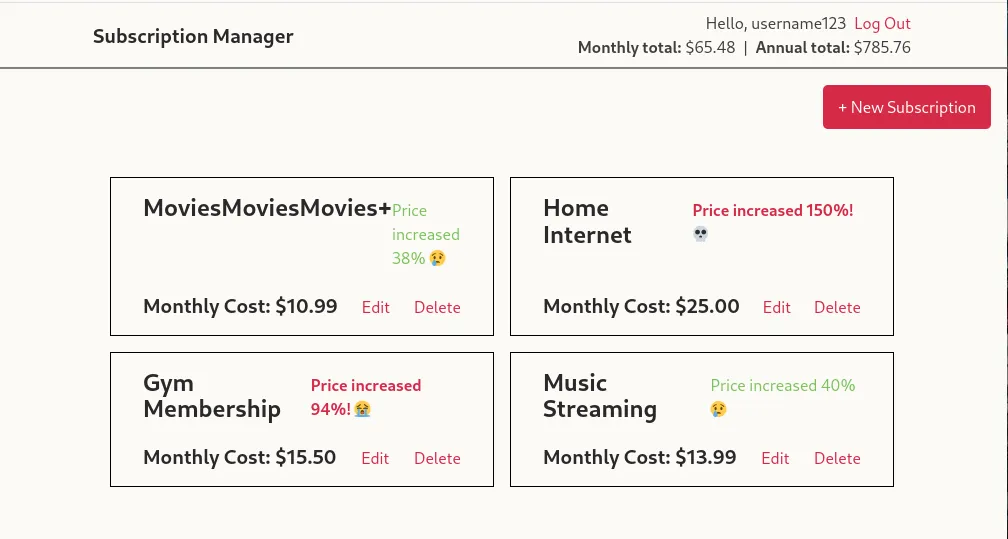
What it does: Self-hostable Rails 8.0 application with Hotwire for managing personal subscriptions. Features unique price history tracking to monitor subscription cost increases over time.
Key Features
- ✅ Price history tracking - Each edit cataloged to show % increase since signup
- ✅ Multi-currency support - Track subscriptions in any currency
- ✅ Monthly & annual subscriptions - Support for both billing cycles
- ✅ Separate user accounts - Multiple users can track their own subscriptions
- ✅ Lightweight & simple - Clean interface without unnecessary complexity
- ✅ Active development - Regularly updated with Rails 8.0 and Ruby 3.4.5
Tech Stack & Deployment
- Stack: Rails 8.0, Hotwire, Ruby 3.4.5, PostgreSQL database
- Deployment: Docker Compose (recommended) OR bare metal
- Requirements: Docker + Docker Compose OR Ruby 3.4.5, Rails, Bundler, PostgreSQL
- DevContainer: Includes VSCode devcontainer config for easy development
Best For
Users who want to track how subscription prices change over time and identify which services keep raising prices.
→ View Subscriptions on GitHubThe Hosted Alternative: SubVault
Self-hosting is powerful, but let's be honest about what it requires:
The Reality of Self-Hosting:
- Initial setup: 1-3 hours configuring Docker, reverse proxy, SSL certificates
- Monthly VPS cost: $5-10 (DigitalOcean, Hetzner, Linode)
- Ongoing maintenance: Updates, security patches, backups, monitoring
- Troubleshooting: You're responsible when something breaks
- Email setup: Most self-hosted tools require separate email service configuration for notifications
SubVault Offers a Different Approach:
- $29 one-time payment (not monthly, not yearly - lifetime access)
- Zero setup - Create account, start tracking immediately
- No server management - We handle infrastructure, updates, backups
- Email renewal reminders - Built-in, no configuration needed
- Works immediately - Any device, any browser
- 30-day money-back guarantee - Risk-free trial
Think of it as: Pay $29 to avoid 10+ hours of setup and maintenance work.
Self-hosting makes sense if you enjoy tinkering with infrastructure and want maximum control. SubVault makes sense if you just want subscription tracking to work without becoming a sysadmin.
Both approaches are valid. Choose based on what you value more: control or convenience.
Skip the Server Setup
SubVault gives you subscription tracking for $29 lifetime. No Docker, no VPS, no maintenance - just add your subscriptions and get reminders.
How to Choose
Choose Self-Hosted If You:
- Enjoy server management and DevOps work
- Want absolute control over your data and infrastructure
- Have technical knowledge (Docker, Linux, web servers)
- Prefer open source solutions on principle
- Have time for setup and ongoing maintenance
- Want ability to customize the code
- Already run a home server or VPS
Choose SubVault If You:
- Want subscription tracking to work immediately
- Prefer not managing servers and infrastructure
- Value your time over saving $29
- Need reliable email reminders without configuration
- Want guaranteed uptime without monitoring
- Prefer having support when issues arise
- Don't want another server to maintain
The best choice depends on your priorities. There's no wrong answer.
Frequently Asked Questions
Are these tools really free?
The software is free and open source, but you'll pay for server hosting. Typical VPS costs range from $5-10/month (DigitalOcean, Hetzner), though free tier options exist (Oracle Cloud) with limitations. So it's "free software" but not free to run.
Over one year, you'll spend $60-120 on hosting. SubVault costs $29 once. Factor in your time value for setup and maintenance when comparing costs.
Do I need technical knowledge?
Yes. At minimum, you need:
- Docker and Docker Compose basics
- Linux command line comfort
- Understanding of web servers and reverse proxies
- Ability to troubleshoot when things break
- SSH and basic server security knowledge
If you're reading Docker documentation for the first time, expect a steep learning curve. These tools assume technical competence.
What are typical hosting costs?
VPS Options:
- DigitalOcean: $6/month (1GB RAM droplet)
- Hetzner: €4/month (~$4.50, excellent European option)
- Linode: $5/month (1GB RAM instance)
- Vultr: $6/month (1GB RAM)
- Oracle Cloud: Free tier available (limited resources)
Additional Costs:
- Domain name: $10-15/year (optional but recommended)
- SSL certificate: Free with Let's Encrypt
- Backups: $1-2/month (or manage yourself)
Total: $5-10/month = $60-120/year
Which is most actively maintained?
Wallos leads with 5.6k+ GitHub stars and frequent updates from an active maintainer. The large community means better documentation and more third-party resources.
SubTrackr and Subs are also actively maintained with recent commits.
Check each project's GitHub repository for:
- Date of last commit (recent is good)
- Number of open/closed issues (active issue resolution)
- Community size (more stars = larger community)
- Documentation quality
Last updated: October 18, 2025. All information verified from official GitHub repositories.
More from the SubVault blog
- How to Organize Your Subscriptions: A 6-Step System That Actually WorksStop wasting $264/year on forgotten subscriptions. Organize everything in one place with our 6-step system. Includes spreadsheet vs. app comparison.
- Free Subscription Tracker Google Sheets TemplateDownload our free Google Sheets subscription tracker. Track monthly/annual spending, renewal dates, and payment methods in one spreadsheet.
- The Subscription Economy: Why 85% Waste $394/Year on Unused ServicesThe subscription economy hit $3T, but 85% waste $394/year on unused subscriptions. Learn why it happens and how to track, manage, and cancel effectively.
- How to Perform a Subscription Audit (Step-by-Step Guide + Real Savings)Learn how to perform a subscription audit in 30 minutes. Real examples, checklist, and proven strategies that saved people $500-1,800/year.
- How to Manage & Cancel Apple Subscriptions on iPhone, Mac & PCHow to find and cancel Apple subscriptions on iPhone (iOS 27), Mac, Windows, Apple TV and the web. Updated 2026 prices for Apple One, Apple TV, Music and iCloud+.
- Free Printable Subscription Tracker Templates (PDF Download)Download free printable subscription tracker templates to manage your subscriptions on paper. Nine professional PDF templates included - perfect for budgeting notebooks and planners.
- 7 Best Rocket Money Alternatives in 2026 (Free & Paid)Compare 7 Rocket Money alternatives for 2026: one-time payment, free and no-bank-link options, plus YNAB, Monarch, Copilot, Simplifi and PocketGuard pricing.