Free Subscription Tracker Google Sheets Template
Download our free Google Sheets subscription tracker. Track monthly/annual spending, renewal dates, and payment methods in one spreadsheet.
Losing track of subscriptions leads to wasted money. The average person has 5-10 active subscriptions, and it's easy to forget what you're paying for until you check your bank statement.
We created a free Google Sheets template to help you organize everything in one place. No installation, no sign-up - just copy the template and start tracking.
Get the Free Template
→ Click here to access the Google Sheets template
Once you open the link, go to File > Make a Copy to create your own version. Then fill in your subscription details.
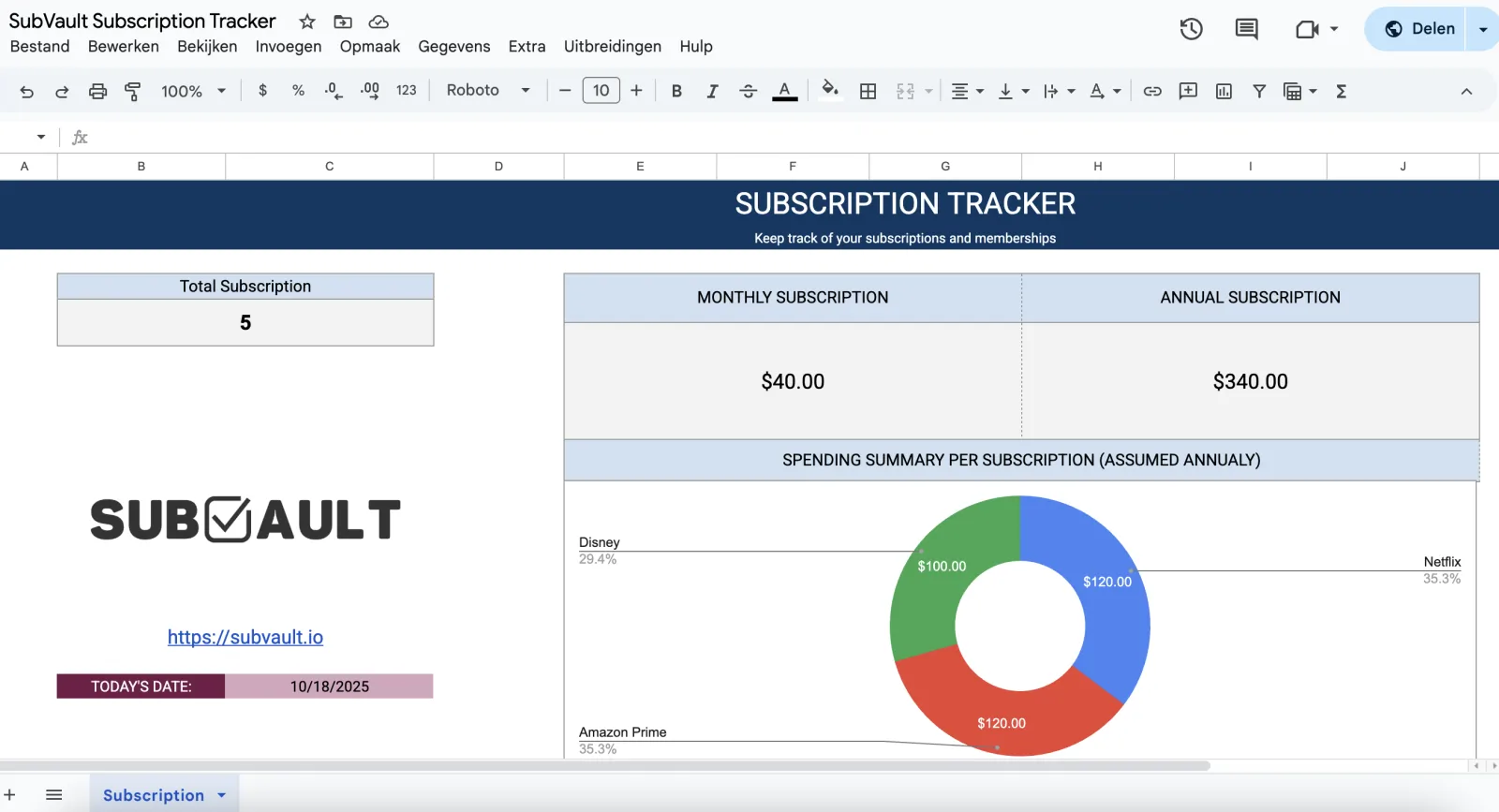
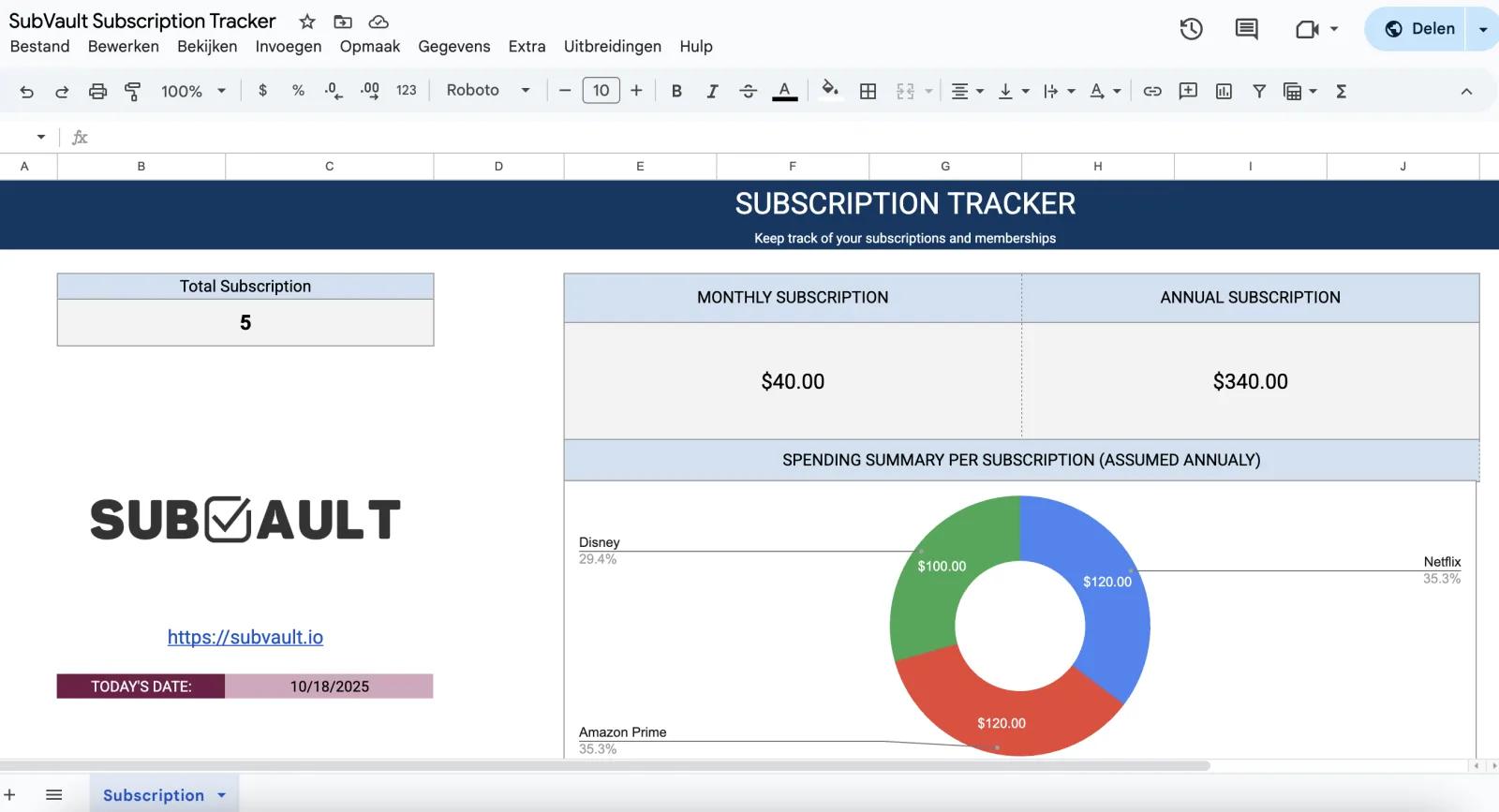
The template includes a visual dashboard showing your total subscriptions, monthly spending, annual spending, and a breakdown pie chart of where your money goes.
What's Included in the Template
The Google Sheets tracker has everything you need to manage your subscriptions:
-
Spending Dashboard - See your total monthly and annual subscription costs at a glance
-
Visual Pie Chart - Breakdown of spending by subscription (automatically calculated)
-
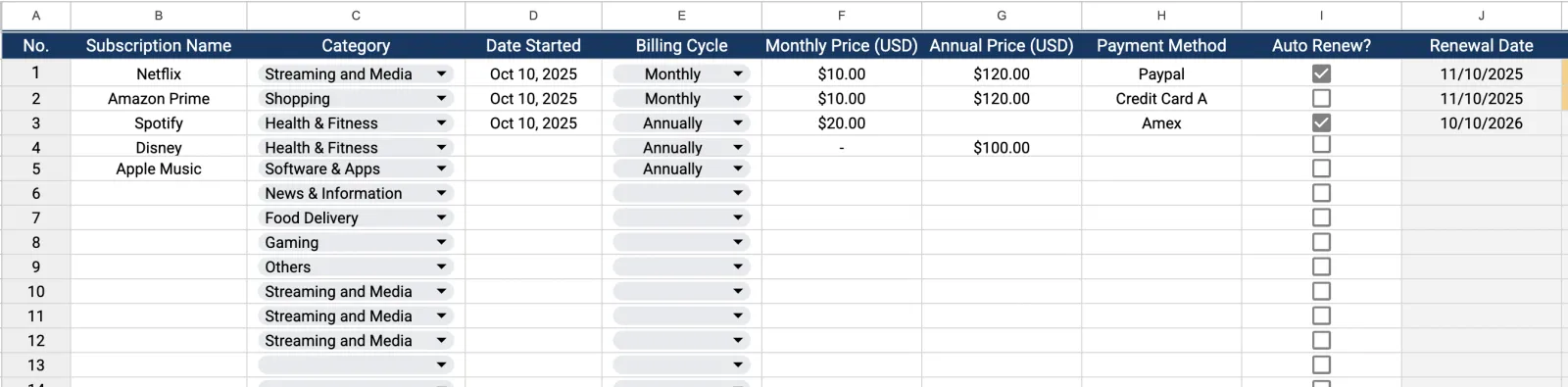
Comprehensive Tracking Table - Track up to 50 subscriptions with these fields:
- Subscription name
- Category (Streaming, Shopping, Health & Fitness, etc.)
- Date started
- Billing cycle (Monthly/Annually)
- Monthly price
- Annual price
- Payment method
- Auto-renew status (checkbox)
- Next renewal date
- Days until renewal
- Notes field
-
Pre-made Categories - Dropdown menus with common subscription types:
- Streaming and Media
- Shopping
- Health & Fitness
- Software & Apps
- News & Information
- Food Delivery
- Gaming
- Others
Everything is linked with formulas, so your dashboard updates automatically as you add subscriptions.
Quick Start Guide
Step 1: Make Your Copy
Click the template link above and select File > Make a Copy from the menu. This creates your own editable version in your Google Drive.
Step 2: Fill In Your Subscriptions
Not sure what subscriptions you have? Check out our complete subscription audit guide to find all your recurring charges before filling out the template.
Add each subscription to a row:
- Enter the name (Netflix, Spotify, etc.)
- Select a category from the dropdown
- Fill in the start date and billing cycle
- Add monthly or annual price (the template calculates the other)
- Note which payment method you use
- Check the auto-renew box if applicable
- The renewal date and days remaining calculate automatically
Step 3: Review Your Dashboard
Once you've entered your subscriptions, scroll to the top to see your spending dashboard. The pie chart shows which subscriptions cost you the most annually.
Use this overview to identify subscriptions you might want to cancel or renegotiate.
Step 4: Set Calendar Reminders (Optional)
Google Sheets won't send automatic renewal reminders, so consider:
- Adding renewal dates to Google Calendar manually
- Setting monthly reminders to review the spreadsheet
- Checking the "days until renewal" column regularly
Or use a tool like SubVault that handles reminders automatically (see below).
Want Automatic Renewal Reminders?
SubVault sends email alerts before renewals so you never get charged unexpectedly. No spreadsheet maintenance required - just $29 lifetime access.
When to Upgrade from Google Sheets
The Google Sheets template is perfect for getting started with subscription tracking. It's free, customizable, and works on any device with a browser.
However, spreadsheet tracking has limitations:
Manual Updates Required Every time a subscription changes price, you renew, or you cancel - you need to remember to update the spreadsheet.
No Automatic Reminders Google Sheets can't send you email alerts before renewals. You have to manually check or set up separate calendar reminders.
Spreadsheet Maintenance You need to keep the file organized, formulas working correctly, and regularly review it to keep data current.
Mobile Experience Editing spreadsheets on phones is functional but not ideal for quick updates.
If these limitations become frustrating, SubVault offers a dedicated subscription tracker for a one-time $29 payment:
- Automated renewal email reminders
- Quick mobile-friendly interface
- No formulas or spreadsheet maintenance
- Instant updates across all devices
- One-time payment (no recurring subscription to track your subscriptions)
Think of Google Sheets as the free starting point, and SubVault as the upgrade when you want automation and convenience.
Frequently Asked Questions
Is this template completely free?
Yes! The Google Sheets template is 100% free to use. Just click the link, make a copy, and start tracking your subscriptions immediately. No sign-up or payment required.
Can I customize the template?
Absolutely. Since it's a Google Sheets file, you can customize everything - add columns, change categories, modify formulas, or adjust the design to match your needs. Make it work for your specific tracking preferences.
Should I use Google Sheets or a dedicated app like SubVault?
Google Sheets is perfect for manual tracking and getting started. If you want automated renewal reminders, instant updates across devices, and no spreadsheet maintenance, SubVault offers those features for a one-time $29 payment.
Use Google Sheets if you:
- Prefer free options
- Don't mind manual updates
- Like spreadsheet flexibility
- Want full control over customization
Use SubVault if you:
- Want automated reminders
- Prefer simple, dedicated tools
- Need mobile-friendly quick access
- Don't want spreadsheet maintenance
Or start with the free template and upgrade to SubVault when you're ready for automation.
Download the Template Now
Ready to organize your subscriptions?
→ Access the free Google Sheets template here
Remember: File > Make a Copy to create your editable version.
Looking for other tracking options? Check out our free printable subscription tracker templates if you prefer paper-based tracking.
Template last updated: October 17, 2025. Works with Google Sheets on desktop, mobile, and tablet.
More from the SubVault blog
- How to Organize Your Subscriptions: A 6-Step System That Actually WorksStop wasting $264/year on forgotten subscriptions. Organize everything in one place with our 6-step system. Includes spreadsheet vs. app comparison.
- 6 Best Open Source Subscription Trackers (Self-Hosted Options)6 open source subscription trackers you can self-host. Compare Wallos, SubTrackr, Subs, and more - plus when a hosted option makes more sense.
- The Subscription Economy: Why 85% Waste $394/Year on Unused ServicesThe subscription economy hit $3T, but 85% waste $394/year on unused subscriptions. Learn why it happens and how to track, manage, and cancel effectively.
- How to Perform a Subscription Audit (Step-by-Step Guide + Real Savings)Learn how to perform a subscription audit in 30 minutes. Real examples, checklist, and proven strategies that saved people $500-1,800/year.
- How to Manage & Cancel Apple Subscriptions on iPhone, Mac & PCHow to find and cancel Apple subscriptions on iPhone (iOS 27), Mac, Windows, Apple TV and the web. Updated 2026 prices for Apple One, Apple TV, Music and iCloud+.
- Free Printable Subscription Tracker Templates (PDF Download)Download free printable subscription tracker templates to manage your subscriptions on paper. Nine professional PDF templates included - perfect for budgeting notebooks and planners.
- 7 Best Rocket Money Alternatives in 2026 (Free & Paid)Compare 7 Rocket Money alternatives for 2026: one-time payment, free and no-bank-link options, plus YNAB, Monarch, Copilot, Simplifi and PocketGuard pricing.