How to Find All Your Subscriptions (Every Place They Hide)
What subscriptions do I have? Check Apple, Google Play, PayPal, Amazon, 13 months of card statements and your email. A step-by-step sweep with an example.
Based on Apple, Google, PayPal and Amazon help pages as of October 2026.
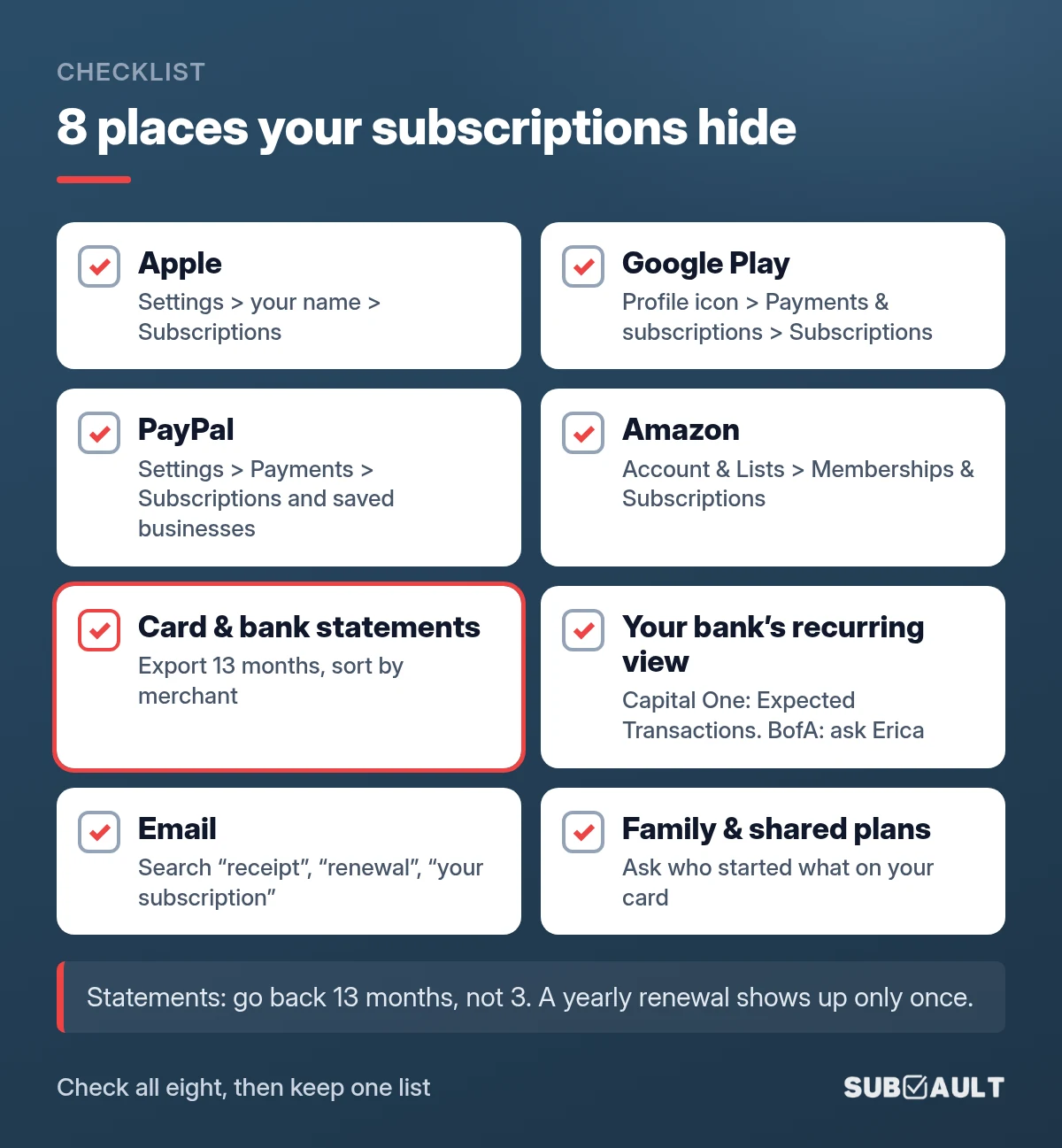
There's a $14.99 charge on your card statement and you have no idea what it is. To find it, and every other subscription, check the four companies that bill for other apps (Apple, Google Play, PayPal and Amazon), then read 13 months of statements for every card and bank account. Finish with an email search for receipts and renewal notices, which catches the yearly charges a statement makes easy to miss.
TL;DR
- ✅ Apple: Settings, tap your name, Subscriptions. Only shows what Apple bills.
- ✅ Google Play: Play app, profile icon, Payments & subscriptions, Subscriptions. Check every Google account.
- ✅ PayPal: Settings, Payments, Subscriptions and saved businesses (or Automatic Payments).
- ✅ Amazon: Account & Lists, Memberships & Subscriptions. Prime Video channels have their own list.
- ✅ Statements: go back 13 months, not 3. Yearly renewals show up once.
- ✅ Email: search "receipt", "renewal" and "your subscription", spam and trash included.
- ✅ Write it down: one list with price, billing cycle, renewal date and the card that pays.
Plan on 30 to 60 minutes the first time. After that, a quarterly check takes ten.

Where are my subscriptions? The places they hide
Your subscriptions are scattered because you bought them in different places: inside an app, through PayPal, straight on a card. One r/personalfinance poster summed up the fear: they were "worried I got some scary annual ones" they had forgotten.
| Where it hides | What it catches | How to check | What it misses |
|---|---|---|---|
| Apple (App Store) | App and in-app subscriptions, Apple services | Settings, tap your name, Subscriptions | Anything paid on a company's website |
| Google Play | Android app subscriptions, Google One, YouTube via Play | Play app, profile icon, Payments & subscriptions, Subscriptions | Google accounts you are not signed in to |
| PayPal | Services where you chose "Pay with PayPal" | Settings, Payments, Subscriptions and saved businesses | Merchants you pay by card directly |
| Amazon | Prime, Prime Video channels, other Amazon subscriptions | Account & Lists, Memberships & Subscriptions | Non-Amazon services |
| Card and bank statements | Everything billed straight to the card | Download 13 months, sort by merchant | What Apple, Google or PayPal bundle under their own name |
| Bank "recurring" tools | Repeat charges your bank has spotted | Capital One: Expected Transactions. Bank of America: ask Erica | Other banks' cards, new or yearly charges |
| Receipts, renewal notices, trial-ending warnings | Search "receipt", "renewal", "your subscription" | Services that never email you | |
| Family and shared plans | Subscriptions a partner or kid started on your card | Ask, and check Family Sharing purchases | Nothing, if you actually ask |
💡 Tip: Billers like Apple and Google appear on your statement under their own name. So one "apple.com/bill" line might be iCloud storage, a fitness app and a VPN. You only see the real services by opening the Apple and Google lists.
Found Them? Now Keep Them in One List
SubVault keeps every subscription you find in one place, with renewal reminders before each charge. One-time $29, no monthly fee, no bank linking.
How do I see my subscriptions on iPhone?
Apple's steps for iPhone:
- Open the Settings app.
- Tap your name at the top.
- Tap Subscriptions.
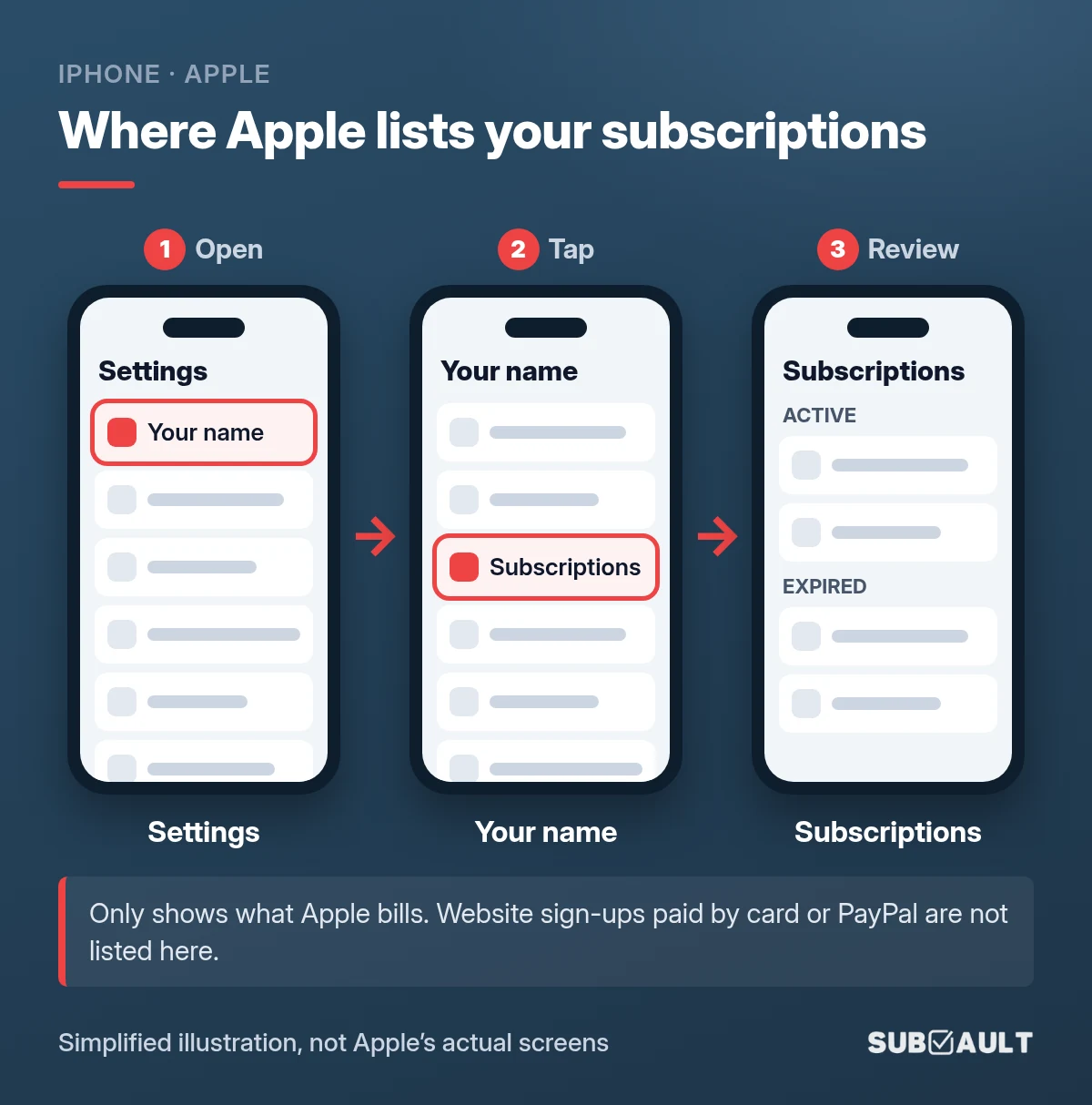
Tap an active subscription to change it or tap Cancel Subscription. No Cancel button? It's already canceled.
A question that keeps coming back in Apple's community forum: "I only see iCloud here, so that's all I have?" No. This list only covers what Apple bills. A streaming service you signed up for on its website lives on your card statement instead. The list is tied to your Apple Account, so check any second Apple Account too.
For charges that say "apple.com/bill": sign in at reportaproblem.apple.com to see what was actually bought. Mac, iPad and refunds are covered in how to manage your Apple subscriptions.
How can I see my Google subscriptions?
In the Google Play app:
- Open the Google Play app.
- Tap your profile icon (top right).
- Tap Payments & subscriptions, then Subscriptions.
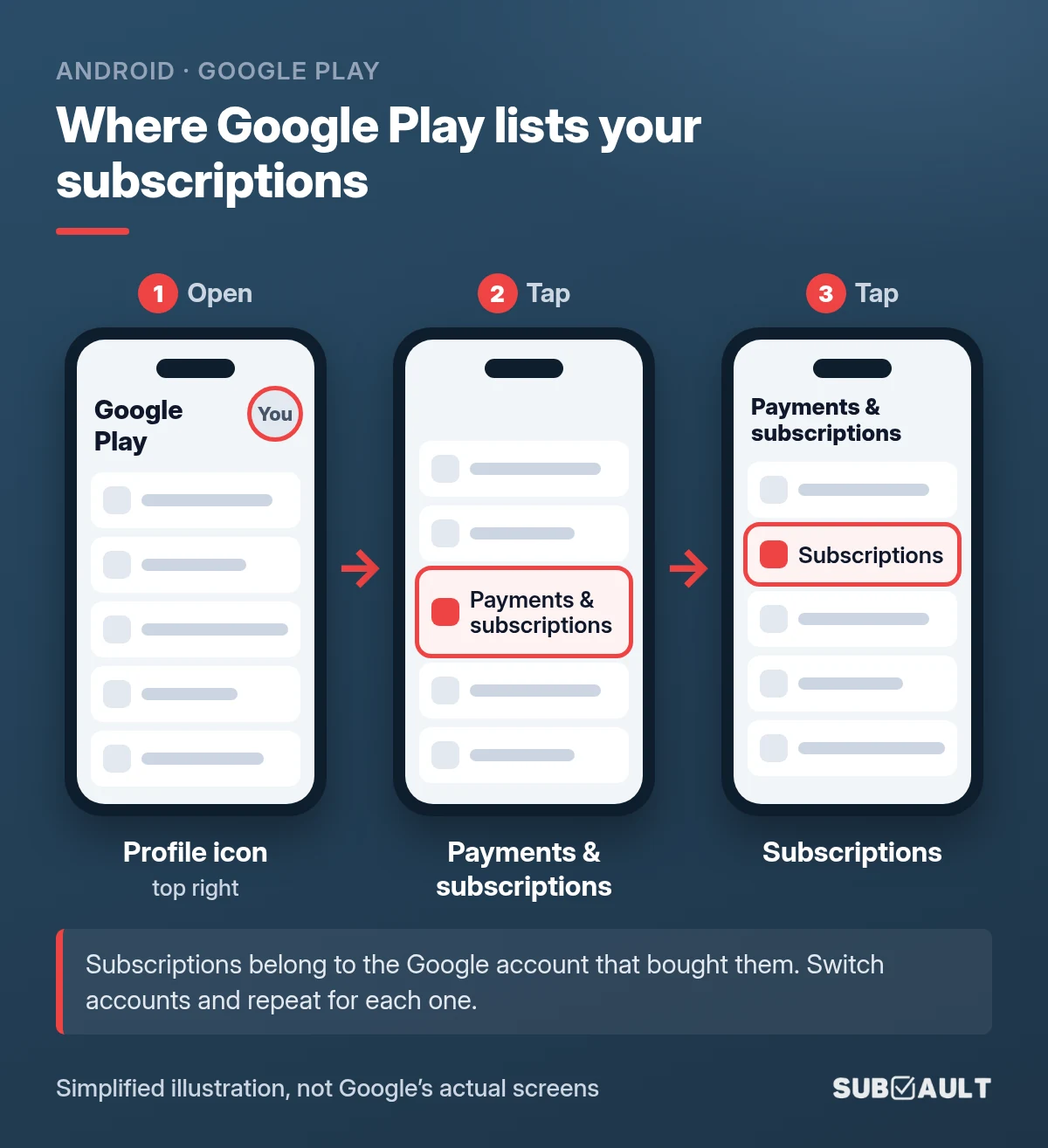
On a computer, go to play.google.com/store/account/subscriptions and click Manage next to a subscription.
Your Google Account has a wider list that can include YouTube and linked news subscriptions. On a computer, open myaccount.google.com, click Wallet & subscriptions, then Manage subscriptions. On Android, it's in the Settings app under Google, your name, Manage your Google Account; that tab may be labeled Wallet & subscriptions or Payments & subscriptions.
Two traps. First, if you can't find a subscription, Google says "it may be on a different account": the work account, the old Gmail, your kid's tablet. Second, uninstalling the app does not cancel the subscription.
For the cancel taps and a checklist of the accounts people forget (old Gmail, a kid's tablet, a work login), see how to cancel subscriptions on Android.
Where are my PayPal subscriptions?
You approved these once at checkout and never typed a card number, which is why they're easy to forget. On the PayPal website:
- Go to Settings (the gear icon).
- Click Payments.
- Select Subscriptions and saved businesses or Automatic Payments (the label depends on your account).
- Select a merchant to see details, cancel, or change the payment method.
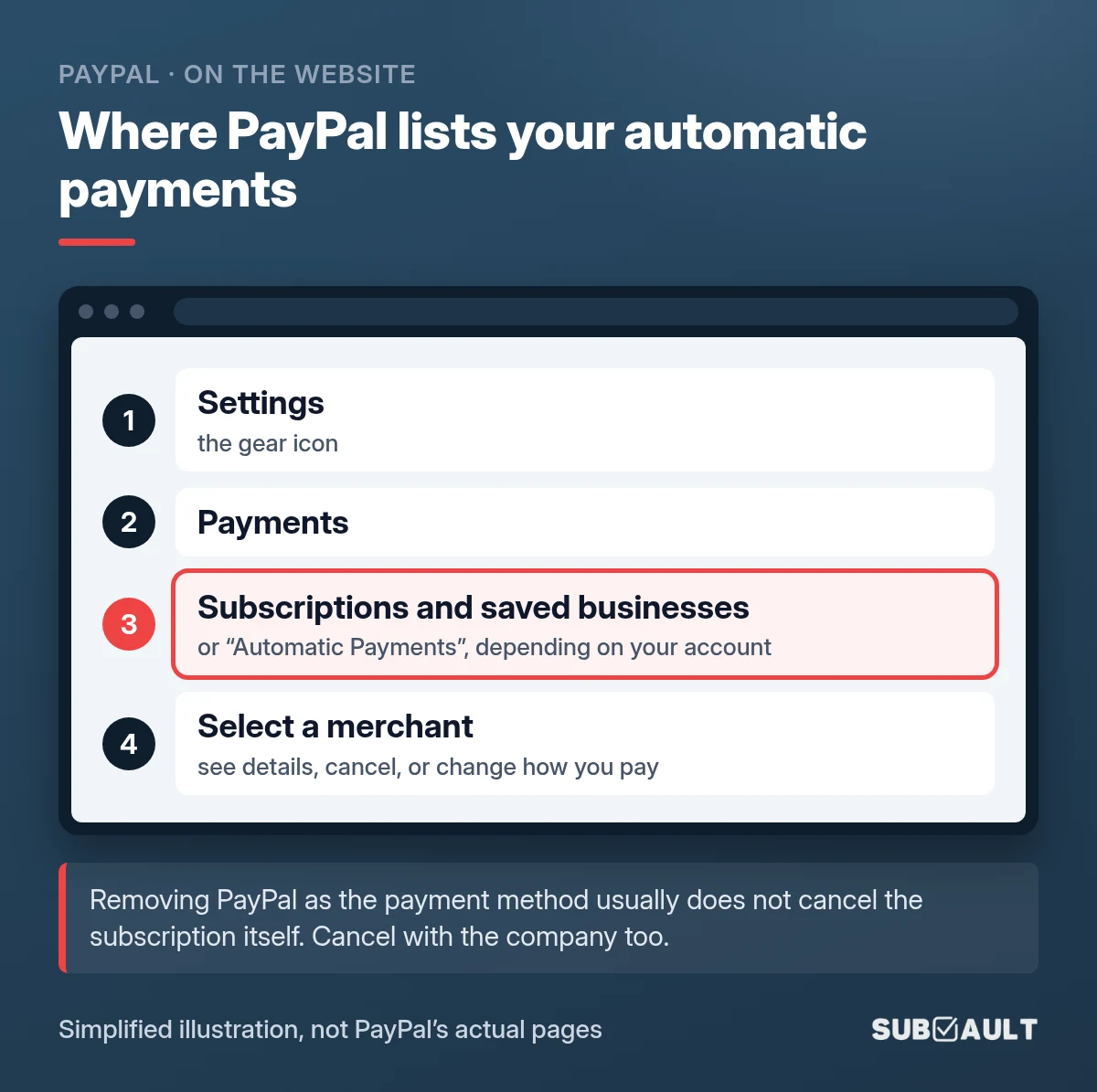
PayPal's own caution: removing PayPal as the payment method "typically does not cancel the underlying subscription or contract." Cancel with the company too, or it may just try your card next. Our guide on how to find and cancel PayPal automatic payments shows the right order.
How do I find subscriptions on Amazon?
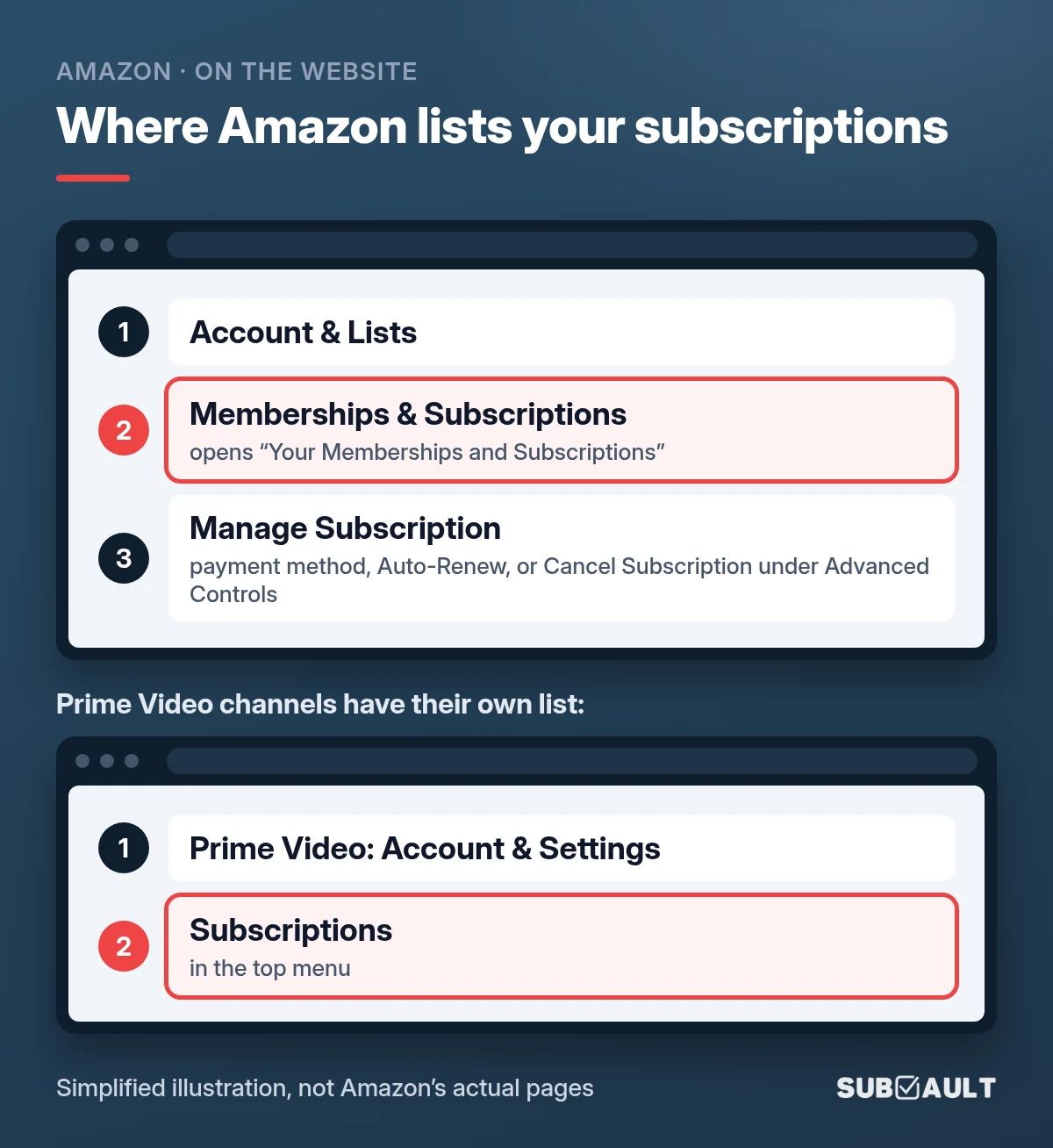
On amazon.com, open Account & Lists and select Memberships & Subscriptions. Amazon's help page calls this page Your Memberships and Subscriptions and says it lists active, canceled and expired subscriptions with the renewal date and price.
Select Manage Subscription to change the payment method, turn Auto-Renew off (select digital subscriptions only), or find Cancel Subscription under Advanced Controls.
Prime Video channels have their own list: in Prime Video, go to Account & Settings and select Subscriptions from the top menu. Check both. Hunting streaming services in particular? Here's how to find all your streaming subscriptions, biller by biller.
What's the best way to find all your subscriptions on a bank or card statement?
This step finds the subscriptions the app stores never knew about. It's also the one people cut short.
- List every card and account, including the old card in the drawer.
- Download 13 months of transactions as a CSV, or the monthly PDF statements. A yearly renewal appears once a year, so three months of history usually misses it.
- Sort by merchant and mark anything that repeats at the same amount: monthly, quarterly or yearly.
- Flag the vague ones. Short codes and processor names need a quick search, or a match against your Apple, Google, PayPal and Amazon lists. Detective hat optional. 🕵️
For a full walkthrough of same-amount, same-day and odd-name patterns on a made-up three-month statement, see how to see what subscriptions you have on your credit card.
💡 Tip: In a spreadsheet, a pivot table by merchant with a count column makes repeats jump out. A count of 12 is monthly. A count of 1 with a round amount is a yearly renewal candidate.
How to find forgotten subscriptions in your email
Statements tell you money left. Email tells you what it was for and when it renews. In Gmail, paste this into the search bar:
in:anywhere newer_than:13m (receipt OR renewal OR "your subscription" OR "will renew" OR "free trial" OR membership)
These are Gmail's own operators: in:anywhere includes Spam and Trash and newer_than:13m covers the last 13 months. Then try "charged", "invoice" and "auto-renew". The same words work in Outlook and Apple Mail.
Can my bank show me all my subscriptions?
Partly. Capital One shows recurring charges under Expected Transactions in its app, though it says spotting them can take a few billing cycles. Bank of America's assistant Erica can show your recurring charges. Both only cover that bank's own accounts and learn from past charges, so they share a statement's blind spot: the yearly renewal. Use them as a cross-check, not the answer.
Will replacing my card stop every subscription?
Our opinion: cancelling your card to kill subscriptions is a bad first move. Visa's documentation describes how Visa Account Updater passes new card numbers and expiration dates to participating merchants that keep cards on file. So some charges keep going, and you also break the subscriptions you wanted. Replace the card for fraud. For forgotten subscriptions, cancel each one at the source.
How many subscriptions am I paying for? The 30-minute sweep
Most people guess low. In a 2022 C+R Research survey of 1,000 U.S. consumers, people first estimated their monthly subscription spending at $86 on average. After going through it category by category, the average was $219. Memory is a bad list.
The sweep, in order:
- Write down what you remember, with a price guess.
- Check the four billers (Apple, Google Play on every account, PayPal, Amazon), then 13 months of statements and your email.
- Ask the household. Partners and kids start trials on shared cards, and two people can end up paying for the same service.
- Put everything in one list with price, billing cycle, next renewal date and the card that pays.
Bart's own audit
From Bart, who built SubVault: "I'm a fan of subscriptions and pay for plenty of them. Subscriptions aren't the problem. Paying for things I don't use is. So I recently went through all my expenses and subscriptions one by one and asked the same questions every time: keep it, downgrade it, cancel it, or could I vibecode this myself? It saved me several hundred euros a month. Part of that was business costs for my company, so it's not a typical result, but most people find at least a few subscriptions they forgot about."
Example audit
This is an illustrative example, not real data. The services and amounts are made up to show the method.
Say someone shares a card with a partner and is sure there are five subscriptions, about $45 a month. Then they run the sweep:
| Subscription | Found in | Billing | Monthly cost | Yearly cost | Decision |
|---|---|---|---|---|---|
| Video streaming | Memory | Monthly | $15.49 | $185.88 | Keep |
| Music streaming | Memory | Monthly | $10.99 | $131.88 | Keep |
| Cloud storage | Memory | Monthly | $2.99 | $35.88 | Keep |
| Gym | Memory | Monthly | $24.99 | $299.88 | Keep |
| News app | Memory | Monthly | $4.99 | $59.88 | Cancel |
| Meditation app | Apple list | Yearly | $5.83 | $69.99 | Cancel |
| Photo editor | Google Play (old account) | Monthly | $7.99 | $95.88 | Cancel |
| VPN | Email search | Yearly | $8.33 | $99.99 | Keep |
| Web hosting | 13-month statement | Yearly | $9.99 | $119.88 | Keep, set reminder |
| Second music plan (partner) | Asked household | Monthly | $10.99 | $131.88 | Merge into family plan |
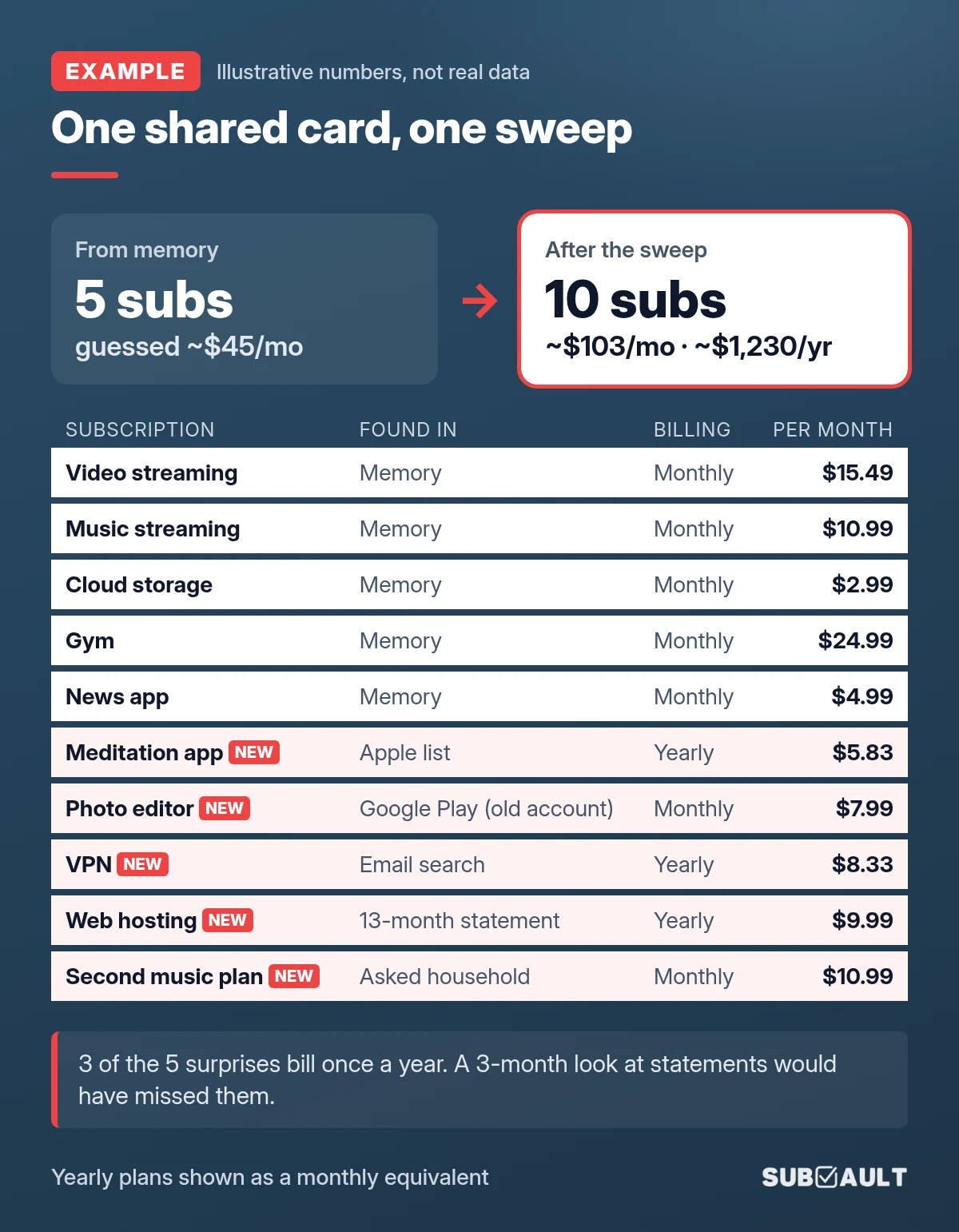
Ten subscriptions instead of five. About $103 a month instead of $45, or roughly $1,230 a year. 😬 Three of the five surprises bill yearly, exactly what a three-month look would miss.
Want your own version of that number? Put your list into the free subscription cost calculator for the monthly and yearly total.
To decide what stays, run a proper subscription audit. To keep the list from drifting, see how to organize your subscriptions.
Is there an app that can show me all my subscriptions?
There are two kinds.
Bank-linked apps connect to your accounts and look for repeat charges. Fast, but with the blind spots above: they see "PayPal" instead of the service and need a few billing cycles to learn a pattern.
Manual trackers don't touch your bank. You enter each subscription once, with its renewal date, and get a reminder before the charge. That is how SubVault works. It can't find subscriptions for you, which is why this guide exists. What it does is keep the list you just built from going stale.
Prefer free? Our Google Sheets subscription tracker template works for a short list. And for trials, where new forgotten subscriptions come from, the free Free Trial Countdown Chrome extension shows every running trial on your new tab page.
FAQ
How do I see all my subscriptions in one place?
No single screen shows everything. Check Apple, Google Play, PayPal and Amazon, then 13 months of statements, then your email, and keep one list.
How do I find subscriptions on my iPhone?
Settings, tap your name, Subscriptions. It only shows what Apple bills.
How can I see my Google subscriptions?
Google Play app, profile icon, Payments & subscriptions, Subscriptions. Repeat for every Google account.
Can my bank show me all my subscriptions?
Some can, like Capital One's Expected Transactions and Bank of America's Erica. They may miss yearly charges.
Will getting a new card number stop my subscriptions?
Not reliably. Updater services can pass your new card details to merchants. Cancel with each merchant instead.
So, what subscriptions do you have?
Now you know. Four biller lists, 13 months of statements and one email search will turn up nearly everything, including the yearly renewals hiding in plain sight. The hard part isn't finding them once. It's not losing track again.
Turn Your Sweep Into a List That Stays Current
Add each subscription to SubVault once and get a reminder before every renewal, yearly ones included. One-time $29 for lifetime access, with a 30-day money-back guarantee.
Sources
- Apple Support: Cancel a subscription from Apple, See your purchases and subscriptions on iPhone, Get help with charges from apple.com/bill
- Google Play Help: Cancel, pause, or change a subscription on Google Play, Review your order history on Google Play
- Google Account Help: Find your purchases, reservations & subscriptions
- Gmail Help: Refine searches in Gmail
- PayPal: What is an automatic payment and how do I update or cancel one?, How to cancel recurring payments
- Amazon: Manage your Amazon subscriptions, Cancel your Prime Video add-on subscription
- Capital One: Managing expected transactions
- Bank of America: Erica virtual financial assistant
- Visa: Visa Account Updater FAQs
- C+R Research: Subscription service statistics and costs
How we made this: we checked every menu path above against the official help pages listed, in October 2026, and read Reddit threads in r/personalfinance, r/Banking and r/povertyfinance plus the Apple and Google Play community forums to see where people get stuck. The step visuals are simplified illustrations, not real screenshots. The founder's audit is Bart's own experience; the example audit uses made-up numbers. Menus change; if a step looks different on your screen, the linked help page has the current version.
Last updated: November 1, 2026
More from the SubVault blog
- How to Find All Your Streaming Subscriptions (and Who Bills Each One)Find every streaming subscription by checking who bills it: the service itself, Apple, Google Play, Amazon add-ons, Roku or your phone plan. Paths inside.
- How to Find and Cancel PayPal Automatic Payments (Remove vs Cancel)Find recurring payments in PayPal under Settings, Payments, Subscriptions and saved businesses. Then cancel with the company: removing PayPal isn't cancelling.
- How to Cancel Subscriptions on Android (and Find the Hidden Ones)Cancel in Google Play under Payments & subscriptions, then check every Google account: old Gmail, a kid's tablet, a work login. Plus what Play doesn't show.
- How to See What Subscriptions You Have on Your Credit CardSee what subscriptions you have on your card: export 3 to 13 months, flag same-amount repeats, decode SQ * and PAYPAL *. Capital One, Chase and Amex paths.
- How to Organize Your Subscriptions: A 6-Step System That Actually WorksUnused subscriptions cost people about $394 a year. Organize every subscription in one place with our 6-step system, plus a spreadsheet vs. app comparison.
- 6 Best Open Source Subscription Trackers (Self-Hosted Options)6 open source subscription trackers you can self-host. Compare Wallos, SubTrackr, Subs, and more, plus when a hosted option makes more sense.
- Free Subscription Tracker Google Sheets TemplateDownload our free Google Sheets subscription tracker. Track monthly/annual spending, renewal dates, and payment methods in one spreadsheet.
- The Subscription Economy: Why 59.9% Waste About $321 a YearA March 2026 Self Financial survey found 59.9% paying for an unused subscription, about $321 a year. Why the bills pile up, and how to track them.
- How to Perform a Subscription Audit (Step-by-Step Guide + Real Savings)How to do a subscription audit in 30 minutes: where subscriptions hide, a keep-or-cancel test, a full checklist, and the habits that stop forgotten charges.
- How to Manage & Cancel Apple Subscriptions on iPhone, Mac & PCHow to find and cancel Apple subscriptions on iPhone (iOS 27), Mac, Windows, Apple TV and the web. Updated 2026 prices for Apple One, Apple TV, Music and iCloud+.
- Free Printable Subscription Tracker Templates (PDF Download)Download free printable subscription tracker templates to manage subscriptions on paper. Nine PDF templates, ready to print on letter or A4 paper.
- 7 Rocket Money Alternatives in 2026 (Including No-Bank-Link Options)Rocket Money moved bill negotiation to $15/mo Premium+ on Nov 2, 2026. Compare 7 alternatives, prices checked in November, incl. pay-once and no-bank-link.