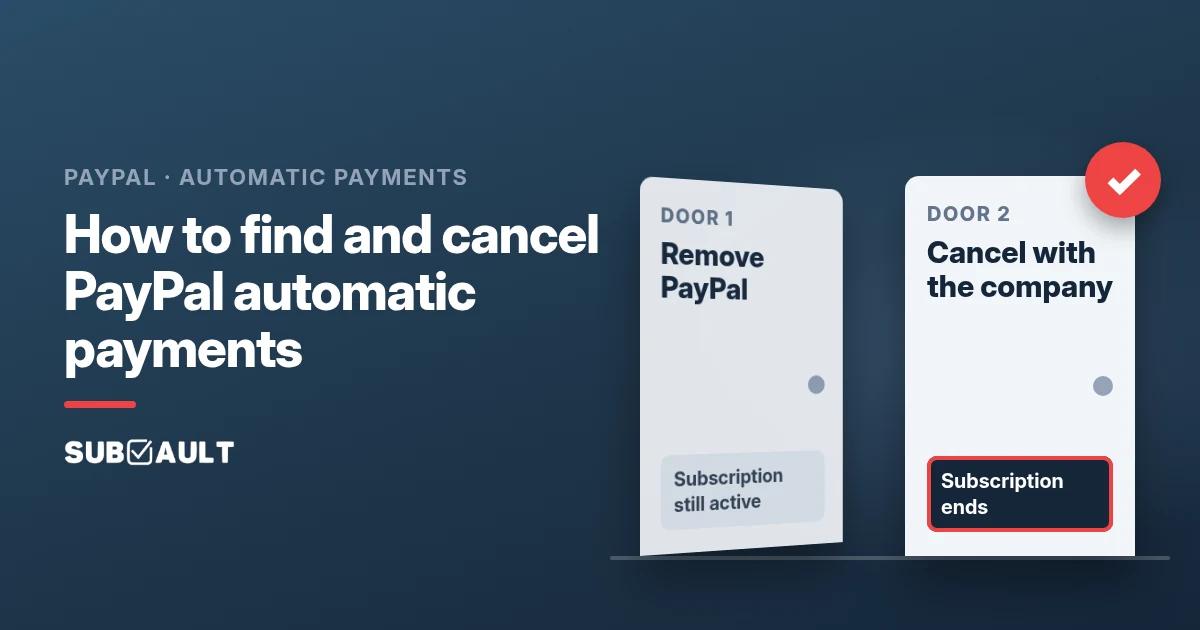
How to Find and Cancel PayPal Automatic Payments (Remove vs Cancel)
Find recurring payments in PayPal under Settings, Payments, Subscriptions and saved businesses. Then cancel with the company: removing PayPal isn't cancelling.
Based on PayPal's US and UK help pages and the US PayPal User Agreement as of November 2026.
You "cancelled" that $12.99 app in PayPal last month. Today there's a $12.99 line on your credit card from the same app. That's just rude. 🙃
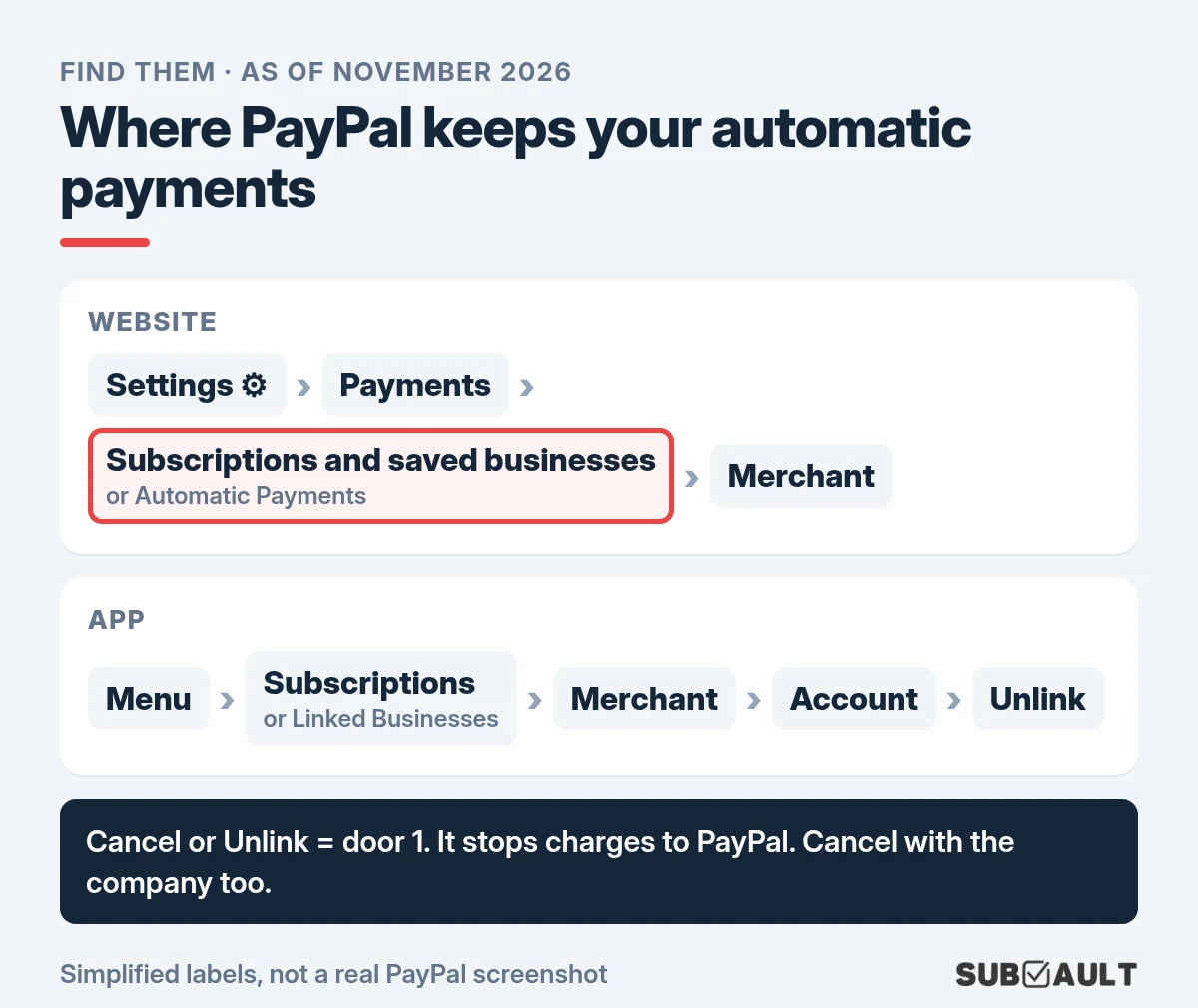
To find recurring payments in PayPal, go to Settings → Payments → Subscriptions and saved businesses (some accounts say Automatic Payments) and pick the merchant. To stop one for real, cancel it with the company too. PayPal's own guide says that removing PayPal as the payment method "typically does not cancel the underlying subscription or contract."
TL;DR
- ✅ Website: Settings (gear) → Payments → Subscriptions and saved businesses, or Automatic Payments → pick the merchant → cancel.
- ✅ App: Menu → Subscriptions (under Manage finances) or Linked Businesses → merchant → Account → Unlink.
- ✅ That's door one: it takes PayPal out of the deal. Door two, cancelling with the company, ends the subscription.
- ✅ Use both: company first, then PayPal, at least 3 business days before the next payment.
- ✅ Not in either list? You probably pay by card. Check your card statement.

How do I find recurring payments in PayPal?
On the website, with PayPal's own labels:
- Log in at paypal.com and click Settings (the gear icon).
- Click Payments.
- Select Subscriptions and saved businesses or Automatic Payments (PayPal's help page lists both labels).
- Select the merchant. From there you can cancel, change the payment method, and find the company's contact info.
In the app, PayPal points to Subscriptions under Manage finances in the menu, and its cancel guide says Subscriptions or Linked Businesses: same room, two door signs.
| You see... | Where | Notes |
|---|---|---|
| Subscriptions and saved businesses | Website: Settings → Payments | Listed first on PayPal's help page |
| Automatic Payments | Website: Settings → Payments | Same list; PayPal's help page names both |
| Subscriptions (Manage finances) | App menu | PayPal's app subscriptions page |
| Linked Businesses | App menu | Check here if something is missing from Subscriptions |
Region and version note: the US and UK help pages use these exact labels. Older guides and PayPal Community threads say "pre-approved payments", one of the names PayPal's user agreement lists for the same thing (next to "billing agreement" and "recurring payment"). Labels shift with app updates, so look for the closest match.
Why isn't a subscription showing in my PayPal list?
Three usual suspects:
- It's brand new. PayPal says new subscriptions can take a few hours to show up in the app and should appear after the first payment.
- It's filed under Linked Businesses. PayPal's FAQ says a subscription "may have been classified incorrectly", so check there too.
- It was never a PayPal subscription. Only payments set up through PayPal can be cancelled there. If you typed your card number on the company's site, the company bills that card directly.
Sometimes the list just glitches. One r/paypal poster saw only "suggested sellers, basically adverts" under Automatic payments while support confirmed one of their subscriptions had just renewed. Then the company's own account page is your way in.
Does removing PayPal cancel the subscription?
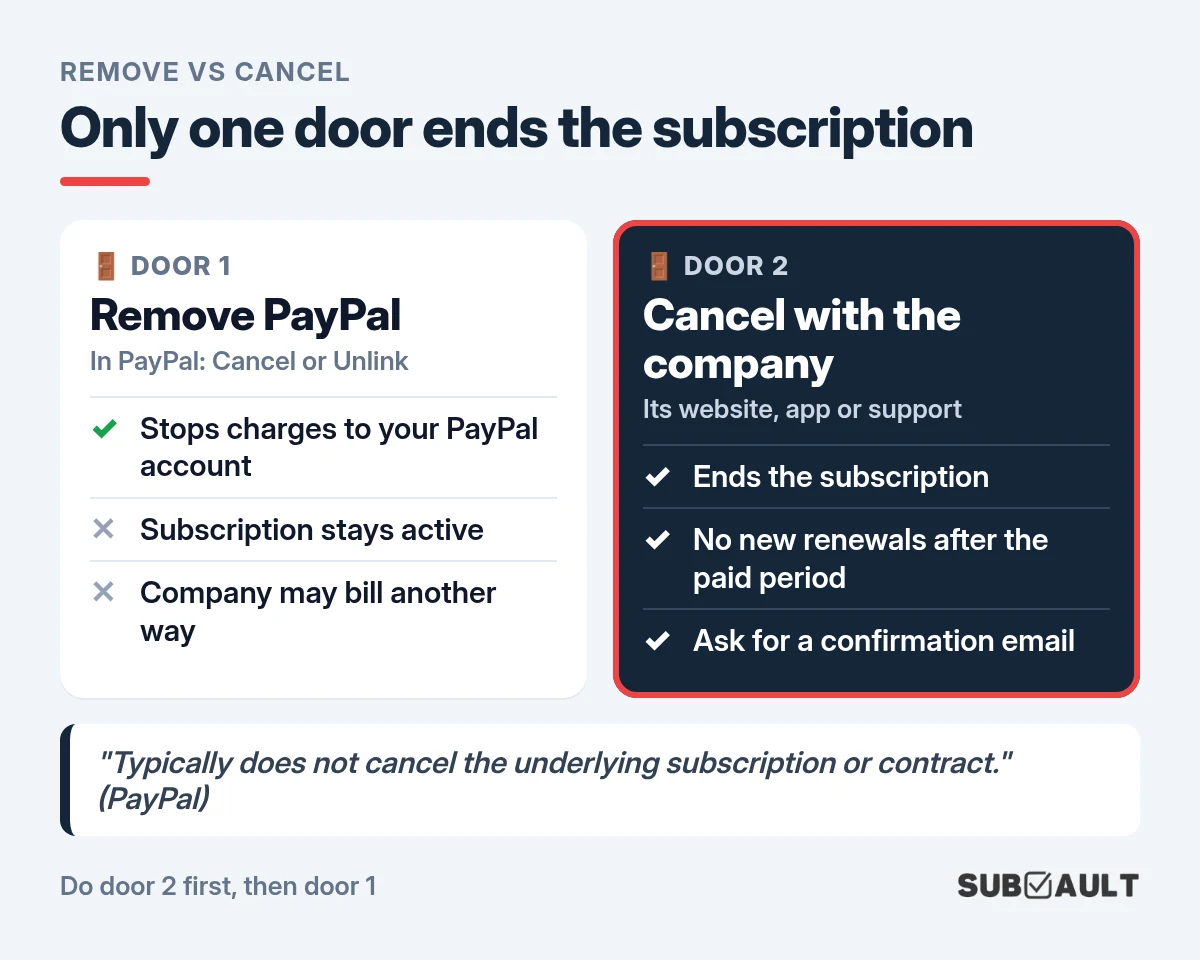
Usually not. Straight from PayPal: canceling a payment method through PayPal "stops future charges to your PayPal account, but this action typically does not cancel the underlying subscription or contract with the service provider."
So there are two doors:
| 🚪 Door 1: remove PayPal | 🚪 Door 2: cancel with the company | |
|---|---|---|
| Where | PayPal: cancel or Unlink | The company's website, app or support |
| What it stops | That company charging your PayPal account | The subscription itself |
| What it doesn't stop | The subscription. The company may ask for payment another way | Nothing, once the paid period ends |
Door 1 is like blocking someone's number and assuming you broke up. They still think you're together, and they'll try your other number. 📞 PayPal's user agreement adds that after you cancel, "you may still owe the seller money" for things you received but didn't pay for.
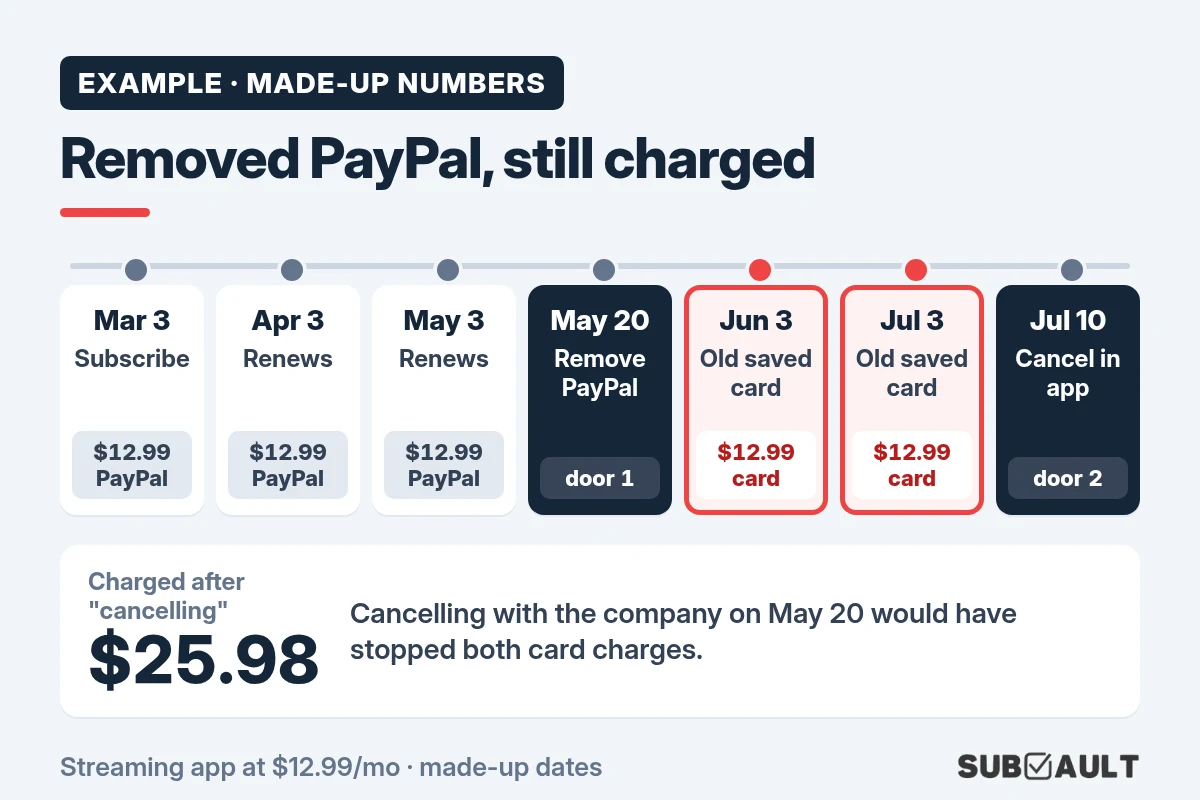
Example: removed PayPal, still charged
Example · made-up numbers and dates. A streaming app at $12.99 a month, paid with PayPal. The app also has an old card saved in its own account settings.
| Date | What happens | Charged |
|---|---|---|
| Mar 3 | You subscribe and pay with PayPal | $12.99 via PayPal |
| Apr 3, May 3 | Normal renewals | $12.99 via PayPal each |
| May 20 | You remove PayPal in Automatic Payments (door 1) | - |
| Jun 3 | The app can't charge PayPal, so it uses the old saved card | $12.99 on the card |
| Jul 3 | Same again | $12.99 on the card |
| Jul 10 | You cancel in the app's account settings (door 2) | - |
Two "cancelled" months cost $25.98 in this example. Made-up, but it's exactly the gap PayPal's own warning describes. Door 2 on May 20 would have stopped it.
Cancelled Something? Write Down Which Door You Used
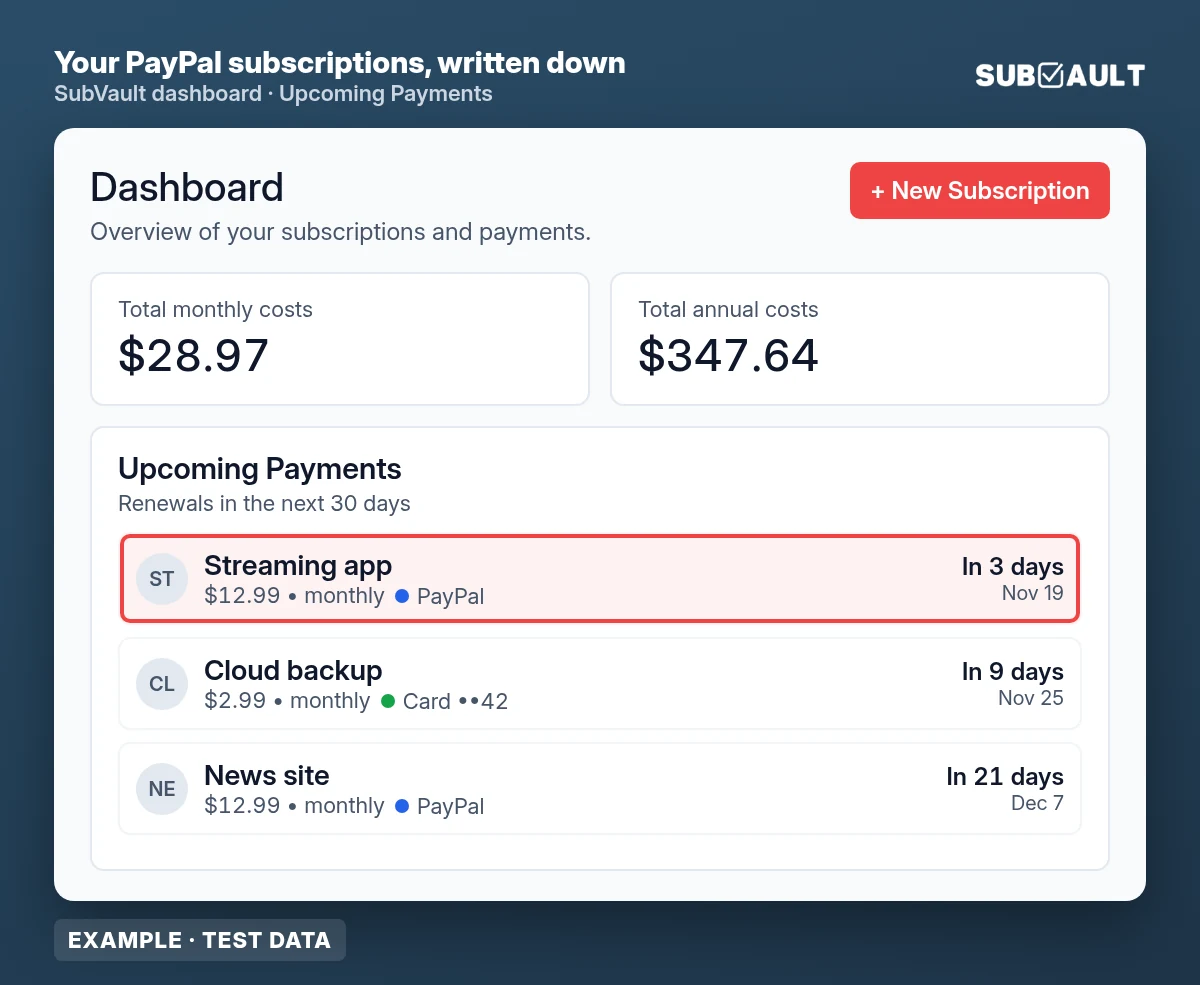
SubVault is a manual tracker: you add each subscription yourself, note how it's paid (PayPal, which card), and get a reminder before it renews. No bank linking, no automatic detection. One-time $29 lifetime, Limited Time Offer, 30-day guarantee.
In what order should I cancel?
Our opinion: company first, PayPal second. Cancelling with the company ends the deal. Cancelling in PayPal is the lock on the door afterwards.
- Cancel with the company, on its website or in its app. No idea how to reach them? The merchant page in PayPal shows their contact info. Keep the confirmation email. 🧾
- Cancel the automatic payment in PayPal. The US user agreement says a personal account can cancel "3 Business Days or more before the date of the next scheduled payment." Closer than that, do it anyway and keep proof.
- On the renewal date, check your PayPal activity and your card statement.
Why step 2 if the company already cancelled? One r/paypal thread: a merchant confirmed a cancellation by email, charged $29.99 a week later anyway, and PayPal denied the claim, asking the buyer to "show proof that the billing agreement was canceled." So keep a receipt from both doors.
Does unlinking a card from PayPal stop the payment?
No, and this one is sneaky. If the card on an automatic payment can't be charged, PayPal's user agreement lets it use your backup payment method (balance first, then bank account, then cards, in a set order). Deleting the card from your wallet just moves the charge down the line. To stop the payment, cancel it on the merchant's page.
What if I'm charged after cancelling?
- Ask the company for a refund, with your cancellation confirmation attached.
- Open a case in PayPal: Resolution Center → Report a Problem → pick the payment → Billing errors or Issues with subscriptions. A reply in the PayPal Community notes that charges under an automatic payment you set up yourself count as a billing issue, not unauthorized activity.
- Mind the clock. For US accounts, PayPal must hear about "other errors" no later than 60 days after the first statement that showed the problem. Report truly unauthorized payments right away.
- Charged on your card directly? Then PayPal isn't involved. Use the credit card statement method to find the merchant, and ask your card issuer about a dispute.
How do I keep track after that?
PayPal's list shows only what goes through PayPal. Your cards, Apple, Google Play and Amazon each keep their own, which is why the five-place sweep exists (Android folks: check every Google account too).
SubVault doesn't connect to PayPal or your bank, and it won't find anything for you. You type each subscription in yourself, with price, renewal date and payment method, and it reminds you before the renewal.
Just started a free trial through PayPal? Our free trial cancel reminder gives you a cancel-by date and a calendar reminder, so you can cancel before the first charge.
FAQ
How do I find recurring payments in PayPal?
Settings → Payments → Subscriptions and saved businesses (or Automatic Payments). App: Subscriptions or Linked Businesses.
How do I cancel PayPal automatic payments?
Cancel the merchant in that list (app: Account → Unlink), then cancel with the company.
Does removing PayPal as a payment method cancel my subscription?
Usually not, says PayPal.
Why can't I see a subscription in PayPal?
It's new, under Linked Businesses, or paid by card.
How far ahead should I cancel a PayPal automatic payment?
3 business days or more before the next payment (US user agreement).
So, which door did you open?
Finding PayPal automatic payments takes four clicks. Cancelling properly takes two doors: the company first, then PayPal, with a receipt from each. Do both and that $12.99 line has nowhere left to go. Then run a quick subscription audit on whatever's left.
Both Doors Closed? Keep the Rest on One List
Add your remaining subscriptions to SubVault with price, renewal date and how each one is paid, and get an email before anything renews. Manual entry, no bank linking. One-time $29, Limited Time Offer, 30-day guarantee.
Sources
- PayPal Help (US): What is an automatic payment and how do I update or cancel one? · PayPal Help (UK): same article
- PayPal: How to cancel recurring payments in 4 ways (January 8, 2026) · Subscriptions in the PayPal app
- PayPal: User Agreement (US), sections Automatic payments, Backup payment method (last updated November 4, 2026)
- PayPal Help: How do I open a dispute with a seller? · Dispute filing timeframes · Report an unauthorized transaction
- PayPal Community: Cancelled automatic payments reappearing
- Reddit r/paypal: Cannot view subscriptions anymore, How do I cancel every subscription that happens via PayPal?, Merchant charged me even after cancelation, Managing Automatic Payments
How we made this: PayPal help pages (US and UK) and the US User Agreement checked on 16 Nov 2026. Forum questions from r/paypal and the PayPal Community. The timeline and amounts are made-up examples. The menu-path images are simplified illustrations, not PayPal screenshots, and labels can differ by app version and region. The SubVault screen is rendered from SubVault's own code with test data.
Last updated: November 16, 2026
More from the SubVault blog
- How to Find All Your Streaming Subscriptions (and Who Bills Each One)Find every streaming subscription by checking who bills it: the service itself, Apple, Google Play, Amazon add-ons, Roku or your phone plan. Paths inside.
- How to Cancel Subscriptions on Android (and Find the Hidden Ones)Cancel in Google Play under Payments & subscriptions, then check every Google account: old Gmail, a kid's tablet, a work login. Plus what Play doesn't show.
- How to See What Subscriptions You Have on Your Credit CardSee what subscriptions you have on your card: export 3 to 13 months, flag same-amount repeats, decode SQ * and PAYPAL *. Capital One, Chase and Amex paths.
- How to Find All Your Subscriptions (Every Place They Hide)What subscriptions do I have? Check Apple, Google Play, PayPal, Amazon, 13 months of card statements and your email. A step-by-step sweep with an example.
- How to Organize Your Subscriptions: A 6-Step System That Actually WorksUnused subscriptions cost people about $394 a year. Organize every subscription in one place with our 6-step system, plus a spreadsheet vs. app comparison.
- 6 Best Open Source Subscription Trackers (Self-Hosted Options)6 open source subscription trackers you can self-host. Compare Wallos, SubTrackr, Subs, and more, plus when a hosted option makes more sense.
- Free Subscription Tracker Google Sheets TemplateDownload our free Google Sheets subscription tracker. Track monthly/annual spending, renewal dates, and payment methods in one spreadsheet.
- The Subscription Economy: Why 59.9% Waste About $321 a YearA March 2026 Self Financial survey found 59.9% paying for an unused subscription, about $321 a year. Why the bills pile up, and how to track them.
- How to Perform a Subscription Audit (Step-by-Step Guide + Real Savings)How to do a subscription audit in 30 minutes: where subscriptions hide, a keep-or-cancel test, a full checklist, and the habits that stop forgotten charges.
- How to Manage & Cancel Apple Subscriptions on iPhone, Mac & PCHow to find and cancel Apple subscriptions on iPhone (iOS 27), Mac, Windows, Apple TV and the web. Updated 2026 prices for Apple One, Apple TV, Music and iCloud+.
- Free Printable Subscription Tracker Templates (PDF Download)Download free printable subscription tracker templates to manage subscriptions on paper. Nine PDF templates, ready to print on letter or A4 paper.
- 7 Rocket Money Alternatives in 2026 (Including No-Bank-Link Options)Rocket Money moved bill negotiation to $15/mo Premium+ on Nov 2, 2026. Compare 7 alternatives, prices checked in November, incl. pay-once and no-bank-link.