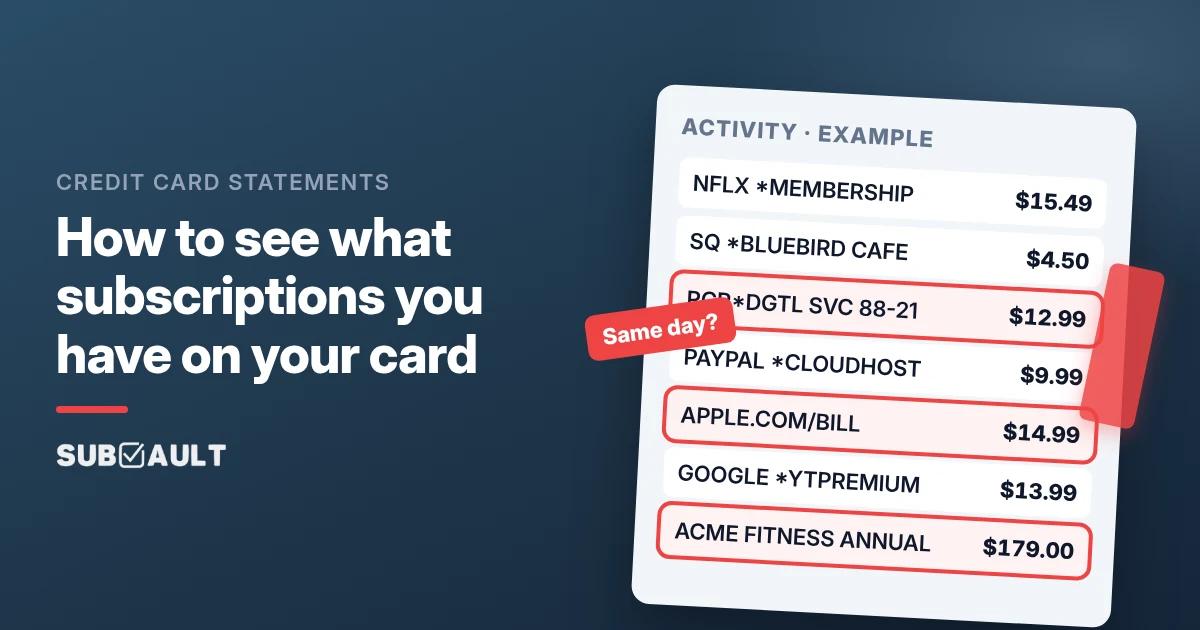
How to See What Subscriptions You Have on Your Credit Card
See what subscriptions you have on your card: export 3 to 13 months, flag same-amount repeats, decode SQ * and PAYPAL *. Capital One, Chase and Amex paths.
Based on Capital One, Chase, American Express and CFPB help pages as of November 2026 (US).
You're staring at a $12.99 line that says something like RCR*DGTL SVC 88-21, and your brain has already filed it under "probably fine." It isn't fine until you've checked. To see what subscriptions you have on your card, export a few months of transactions, highlight same-amount same-day repeats, and decode the weird prefixes. That is the whole job.
TL;DR
- ✅ Export the full transaction list, not just the PDF summary. Three months minimum; 12 to 13 if you want yearly renewals.
- ✅ Look for rhythm, not size. Same merchant, similar amount, roughly the same day each month (or once a year).
- ✅ Decode the descriptor. Strip
SQ *,PAYPAL *,APPLE.COM/BILL,GOOGLE *,AMZN/ Amazon Digital. The brand you remember is often behind the billing company. - ✅ Use issuer tools when they exist. Capital One: Expected Transactions / Upcoming Bills. Chase: Stored cards. Amex: download history and scan; no dedicated list.
- ✅ Block ≠ cancel. Stop the subscription with the merchant. A bank block is a seatbelt, not the off switch.
- ✅ Write them down. Price, cycle, renewal date, which card. A full sweep catches what Apple, Google, PayPal and Amazon hide under their own names.
Plan on 20 to 40 minutes for one card. Highlighter strongly recommended.

How do I see what subscriptions I have on my card?
Open your card's website or app, pull the transaction history (CSV if they offer it), and go looking for repeats. On most cards there is no special "Subscriptions" tab. Recurring charges sit in the same list as groceries, wearing a slightly different coat.
A r/amex poster asked it straight: is there a way to review all subscriptions on the card? Amex: no single list. Capital One and Chase: helpful screens that still miss yearly charges. The statement scan works on every issuer.
💡 Tip: one month of history can show a monthly charge. It cannot show a yearly one.
How can I check what subscriptions I have on my card in my bank's app?
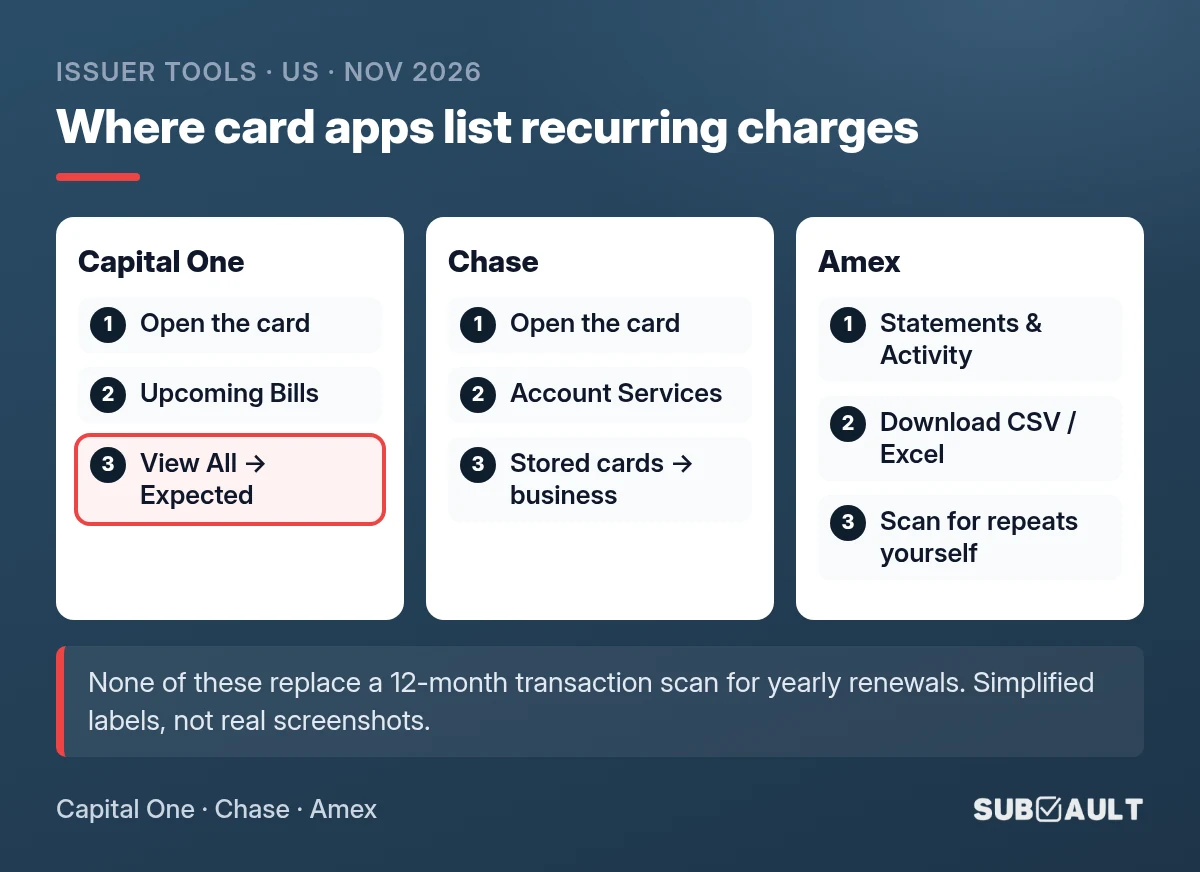
Sometimes the card app already has a list. Treat it as a shortcut. Paths checked against each issuer's help pages in November 2026 (US); labels can differ by app version.
| Issuer | Where to look | What it catches | What it misses |
|---|---|---|---|
| Capital One | Mobile app: card → Upcoming Bills → View All (Bills & Subscriptions / Expected Transactions) | Recurring charges spotted from past activity; some block/cancel options | New or yearly charges; other banks' cards; estimates can drift |
| Chase | Mobile app: card → Account Services → Stored cards → business → Latest repeating charges | Merchants holding your card; recent repeats; irregular-amount alerts | Annual renewals not yet "repeating"; other banks |
| Amex | Online: Statements & Activity; download PDF, Excel or CSV (up to ~2 years) | Everything that hit the Amex | No dedicated subscriptions screen (scan statements yourself) |
| Other cards | Export transactions, or ask support if they have a recurring view | Whatever that bank has built | Assume nothing until you open it |
Capital One is clear that blocking does not cancel the subscription. Chase Stored cards shows where your number is saved. Amex's own advice: review statements and cancel with the merchant first.
How do I read a statement for recurring charges?
Think of it as three passes with a highlighter, not one heroic scroll.
- Download the transactions, not the summary. Prefer CSV or a full activity export over a PDF cover page.
- Pull enough history. Three months for monthly rhythm; 12 to 13 for yearly gym, domain or cloud plans.
- Sort by amount, then scan dates. Same dollar amounts cluster. Price hikes move the figure, so also watch the same day-of-month.
- Flag odd names. Anything you would not say out loud at dinner gets a mark.
- Cross-check Apple, Google Play and PayPal. Those names often hide several subscriptions. The five-place sweep covers those lists.
A r/povertyfinance commenter put it bluntly: eyes on twelve months of statements, and a list you can tick as you cancel.
Found the Repeats? Keep Them in One List
SubVault is a manual tracker: you add each subscription yourself, no bank linking and no automatic detection. One-time $29 for lifetime access, Limited Time Offer, with a 30-day money-back guarantee.
What do cryptic descriptors like SQ *, PAYPAL * and APPLE.COM/BILL mean?
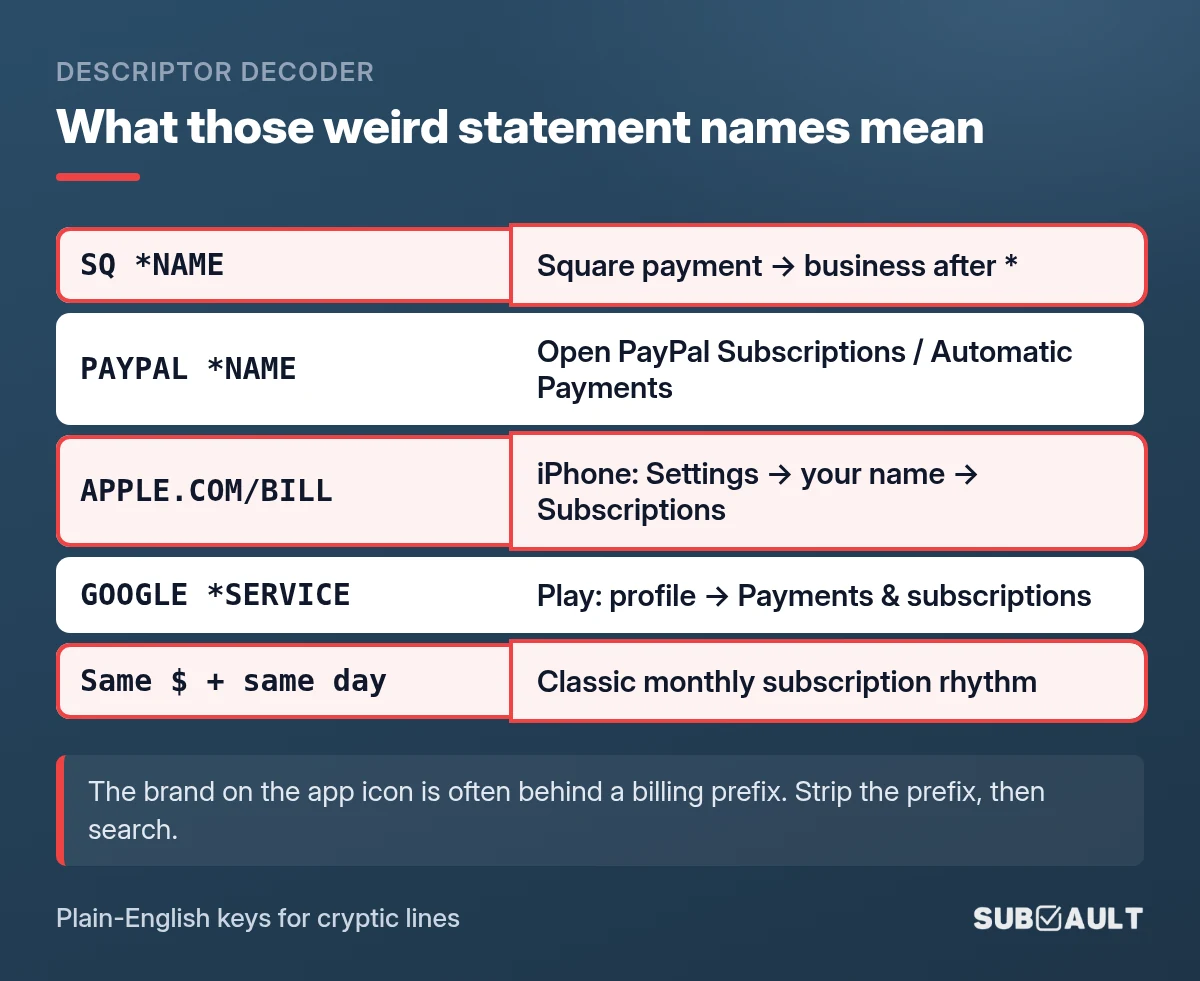
The name on the statement is often the billing entity, not the brand on the app icon. Strip the prefix, then search the rest.
| You see on the statement | What it usually means | Where to look next |
|---|---|---|
SQ *SOMETHING | Square processed the payment; the bit after * is the business | Search the name after the asterisk; check email receipts |
PAYPAL *SOMETHING or PAYPAL INST XFER | PayPal took the money | PayPal: Settings → Payments → Subscriptions and saved businesses (or Automatic Payments). How to find and cancel them |
APPLE.COM/BILL | Something Apple billed (iCloud, App Store app, Apple service) | iPhone: Settings → your name → Subscriptions; also reportaproblem.apple.com |
GOOGLE *SERVICE | Google Play or Google billing | Play app → profile → Payments & subscriptions → Subscriptions; repeat per Google account |
AMZN / Amazon Digital / similar | Amazon digital stuff (Prime-related, channels, Kindle, etc.) | Amazon: Account & Lists → Memberships & Subscriptions |
| Same amount, same day, 3 months | Classic monthly subscription pattern | Put it on your list even if the name looks ugly |
When the line starts with GOOGLE * and it is missing from the account you are signed into, it is usually on another Google account. The account checklist is in how to cancel subscriptions on Android.
A streaming line that starts with ROKU FOR or APPLE.COM/BILL means a middleman bills you for it. Our guide to finding all your streaming subscriptions shows where each of those billers keeps its list.
Opinion time: the ugliest line on your statement is usually the one you should decode first, not the Netflix you already know about. Mystery loves a bad abbreviation.
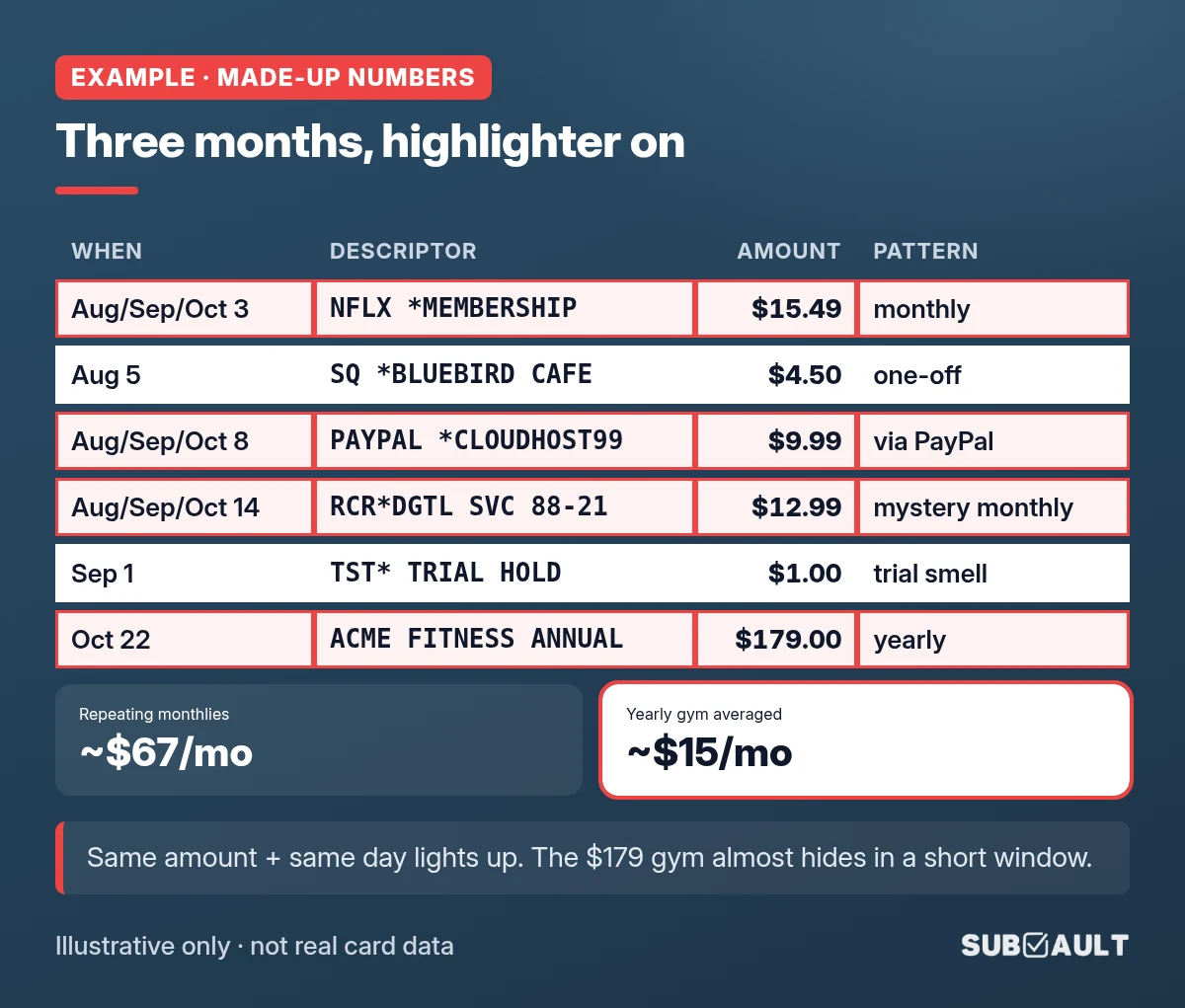
Example: three months of a made-up statement, decoded
Example · made-up numbers. One Visa, Aug to Oct. Not anyone's real card.
| Date | Descriptor | Amount | What the highlighter says |
|---|---|---|---|
| Aug 3 / Sep 3 / Oct 3 | NFLX *MEMBERSHIP | $15.49 | Same day + amount three times → monthly streaming |
| Aug 5 | SQ *BLUEBIRD CAFE | $4.50 | One-off Square charge → skip |
| Aug 8 / Sep 8 / Oct 8 | PAYPAL *CLOUDHOST99 | $9.99 | Monthly via PayPal → open PayPal Subscriptions for the merchant |
| Aug 12 / Sep 12 / Oct 12 | APPLE.COM/BILL | $14.99 | Monthly Apple biller → Settings → your name → Subscriptions for the real apps |
| Aug 14 / Sep 14 / Oct 14 | RCR*DGTL SVC 88-21 | $12.99 | Ugly name, perfect rhythm → search the string + email for "12.99" |
| Aug 28 | GOOGLE *YTPREMIUM | $13.99 | Google-billed YouTube Premium |
| Sep 1 | TST* TRIAL HOLD | $1.00 | Tiny new hold → calendar a cancel reminder |
| Oct 22 | ACME FITNESS ANNUAL | $179.00 | Once in three months → yearly gym; a 13-month export is safer |
What lit up:
- Monthlies: streaming $15.49, PayPal hosting $9.99, mystery
RCR*DGTL$12.99, Google YouTube $13.99, Apple bundle $14.99. - Skipped: the Square cafe one-off.
- Trial smell: the $1.00
TST*hold. Our free trial cancel reminder turns that into a cancel-by date in your calendar. - Yearly almost-miss: the $179 gym. If that anniversary fell in July, Aug to Oct would have missed it.
Repeating lines (Apple as one line): about $67/mo, plus the yearly gym averaged around $15/mo. Example data only. Your card will be messier. For your own total, put the list into the free subscription cost calculator.
When the list is on paper (or in a sheet), run a proper subscription audit to decide what stays, and organise the keepers so the next quarter is a ten-minute job.
What if I still can't place a charge?
Work the options in order. Do not jump to a new card number first (updater services can follow you anyway).
- Search the exact descriptor in quotes, plus the amount.
- Ask the household. Shared logins create a lot of "mystery" lines.
- Check Apple / Google Play / PayPal / Amazon.
- Search email for the amount, "receipt" or "renewal" (spam and trash too).
- Cancel with the merchant in writing, keep the confirmation.
- If charges continue, contact the issuer. US cards: CFPB on disputing a charge (written notice within 60 days of the statement that first showed it) and stopping automatic payments.
FAQ
How do I see what subscriptions I have on my card?
Export a few months of transactions, flag same-amount same-day repeats, decode the prefixes, then check Apple, Google Play and PayPal.
How can I check what subscriptions I have on my card in my bank's app?
Capital One and Chase have partial views. Amex does not. None replace a 12-month scan for yearly charges.
How far back should I look on my statement?
Three months for monthlies; 12 to 13 months for yearly renewals.
What does SQ * or PAYPAL * mean on my statement?
Billing prefixes. The merchant is after the asterisk, or inside PayPal, Apple, Google or Amazon.
Will blocking a charge at my bank cancel the subscription?
No. Cancel with the merchant. Use a bank block only as backup.
So, what is actually on your card?
Same-amount, same-day, odd-name. Those three patterns turn an activity feed into a subscription list. Issuer tools help; your eyes on 3 to 13 months of transactions still do the real work. Write it down once, then keep the list in SubVault (manual entry, lifetime plan) so the next renewal does not sneak up.
Done Highlighting? Save the List Before It Goes Stale
Add each recurring charge to SubVault with its renewal date and get a reminder before the next hit. Manual entry, no bank linking. One-time $29, Limited Time Offer, 30-day guarantee.
Sources
- Capital One: Managing expected transactions, Subscription management
- Chase: Stored cards
- American Express: Recurring payments, Transaction history
- CFPB: Dispute a charge, Stop automatic payments
- Apple: Cancel a subscription · Google Play: Cancel or change · PayPal: Automatic payments
How we made this: Capital One, Chase, Amex and CFPB pages re-checked on 5 Nov 2026; threads from r/amex, r/povertyfinance and r/AusFinance. Example amounts are made-up. Issuer panels and the decoder card are simplified illustrations, not real screenshots or logos.
Last updated: November 16, 2026
More from the SubVault blog
- How to Find All Your Streaming Subscriptions (and Who Bills Each One)Find every streaming subscription by checking who bills it: the service itself, Apple, Google Play, Amazon add-ons, Roku or your phone plan. Paths inside.
- How to Find and Cancel PayPal Automatic Payments (Remove vs Cancel)Find recurring payments in PayPal under Settings, Payments, Subscriptions and saved businesses. Then cancel with the company: removing PayPal isn't cancelling.
- How to Cancel Subscriptions on Android (and Find the Hidden Ones)Cancel in Google Play under Payments & subscriptions, then check every Google account: old Gmail, a kid's tablet, a work login. Plus what Play doesn't show.
- How to Find All Your Subscriptions (Every Place They Hide)What subscriptions do I have? Check Apple, Google Play, PayPal, Amazon, 13 months of card statements and your email. A step-by-step sweep with an example.
- How to Organize Your Subscriptions: A 6-Step System That Actually WorksUnused subscriptions cost people about $394 a year. Organize every subscription in one place with our 6-step system, plus a spreadsheet vs. app comparison.
- 6 Best Open Source Subscription Trackers (Self-Hosted Options)6 open source subscription trackers you can self-host. Compare Wallos, SubTrackr, Subs, and more, plus when a hosted option makes more sense.
- Free Subscription Tracker Google Sheets TemplateDownload our free Google Sheets subscription tracker. Track monthly/annual spending, renewal dates, and payment methods in one spreadsheet.
- The Subscription Economy: Why 59.9% Waste About $321 a YearA March 2026 Self Financial survey found 59.9% paying for an unused subscription, about $321 a year. Why the bills pile up, and how to track them.
- How to Perform a Subscription Audit (Step-by-Step Guide + Real Savings)How to do a subscription audit in 30 minutes: where subscriptions hide, a keep-or-cancel test, a full checklist, and the habits that stop forgotten charges.
- How to Manage & Cancel Apple Subscriptions on iPhone, Mac & PCHow to find and cancel Apple subscriptions on iPhone (iOS 27), Mac, Windows, Apple TV and the web. Updated 2026 prices for Apple One, Apple TV, Music and iCloud+.
- Free Printable Subscription Tracker Templates (PDF Download)Download free printable subscription tracker templates to manage subscriptions on paper. Nine PDF templates, ready to print on letter or A4 paper.
- 7 Rocket Money Alternatives in 2026 (Including No-Bank-Link Options)Rocket Money moved bill negotiation to $15/mo Premium+ on Nov 2, 2026. Compare 7 alternatives, prices checked in November, incl. pay-once and no-bank-link.